> ## Documentation Index
> Fetch the complete documentation index at: https://docs.dojah.io/llms.txt
> Use this file to discover all available pages before exploring further.

# Compliance

> Submit your business details so Dojah can approve your account to go live. It’s the first thing to do once you’re inside the dashboard.

**Compliance** is the first item in the sidebar — marked with a red dot until it’s complete. It’s where you tell Dojah who your business is. Until your submission is approved, your account stays in **sandbox**; once it’s approved, you can switch to **live mode**.

Compliance is a guided, four-step form shown down the left of the page: **Business Details**, **Business Documents**, **Directors’ Details**, and the **MSA**. Each step validates before you can continue, and you can jump back to any completed step from the stepper. Every step also has a **Compliance Requirement** link that opens detailed guidance on exactly what’s expected.

<Note>
  **The form adapts to your country.** Dojah verifies businesses across Africa, so the exact fields depend on where your company is registered. Each step below describes the general requirement, with the country-specific details called out. *(Screenshots show the Nigerian flow as an example.)*
</Note>

## Step 1 — Business Details

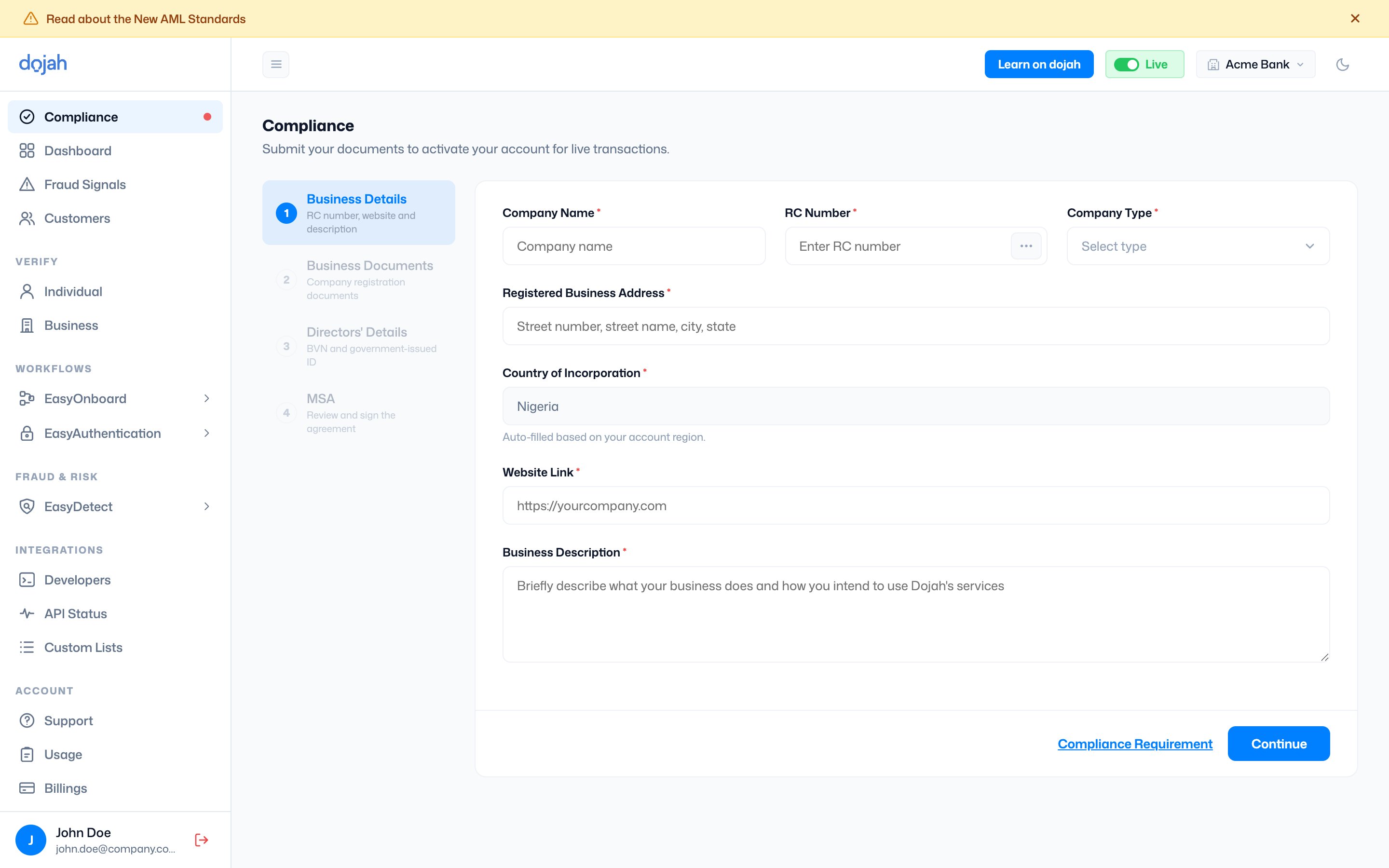
Identify your company. Provide your registration details, registered business address, website, and a short description of what you do and how you’ll use Dojah. Your country of incorporation is filled in automatically from your account region.

| Field                       | Required | What it’s for                                                                 |
| --------------------------- | -------- | ----------------------------------------------------------------------------- |
| Company registration        | Yes      | Your official company registration number, so Dojah can confirm the business. |
| Registered Business Address | Yes      | Your company’s registered address.                                            |
| Country of Incorporation    | Yes      | Auto-filled from your account region.                                         |
| Website Link                | Yes      | A live, publicly accessible company website, e.g. `https://yourcompany.com`.  |
| Business Description        | Yes      | What your business does and how you intend to use Dojah’s services.           |

<div className="dj-regions">
  <div className="dj-region">
    <div className="dj-region-head">
      <span className="dj-region-flag">🇳🇬</span>
      <span className="dj-region-title">Nigeria</span>
    </div>

    Enter your **RC number** and select **Verify** — Dojah resolves it against CAC, confirms your **Company Name**, and sets the **Company Type** (Business Name, Incorporated Trustees, or Limited Partnership).
  </div>

  <div className="dj-region">
    <div className="dj-region-head">
      <span className="dj-region-flag">🌍</span>
      <span className="dj-region-title">Other countries</span>
    </div>

    Enter your **business incorporation number**. The company name and type aren’t auto-resolved — you enter your details directly.
  </div>
</div>

<img src="https://mintcdn.com/dojah/LZxS1bz_9Y9K9GSQ/images/dashboard-guide/compliance-1-details.png?fit=max&auto=format&n=LZxS1bz_9Y9K9GSQ&q=85&s=16c6892857ecb73d9a0f9ebe20d625ae" alt="Compliance Step 1 — Business Details" width="2880" height="1800" data-path="images/dashboard-guide/compliance-1-details.png" />

## Step 2 — Business Documents

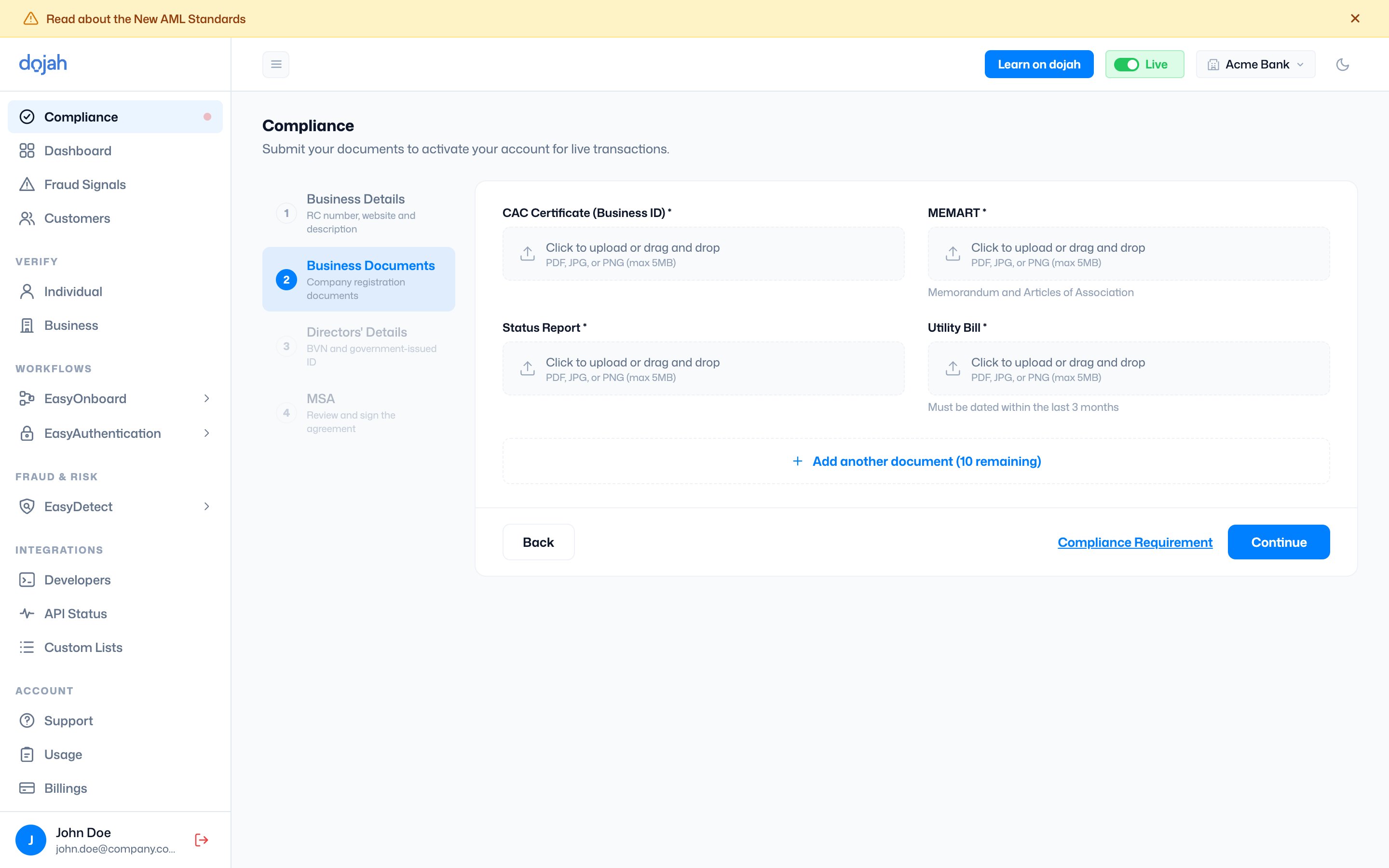
Upload the documents that prove your registration and address. Each upload accepts a single file — drag and drop, or click to browse. You can attach additional supporting documents with **“+ Add another document”** (licenses, regulatory approvals, or partnership agreements) — these are required if you offer a regulated service.
<div className="dj-regions">
  <div className="dj-region">
    <div className="dj-region-head">
      <span className="dj-region-flag">🇳🇬</span>
      <span className="dj-region-title">Nigeria</span>
    </div>

    **CAC Certificate** (Business ID), **MEMART** (Memorandum & Articles of Association), **Status Report**, and a **Utility Bill** dated within the last 3 months.
  </div>

  <div className="dj-region">
    <div className="dj-region-head">
      <span className="dj-region-flag">🌍</span>
      <span className="dj-region-title">Other countries</span>
    </div>

    Your **Certificate of Incorporation**, plus any supporting documents that apply to your business.
  </div>
</div>

<Tip>
  **File requirements.** Each document can be a **PDF, JPG, or PNG**, up to **5 MB**. Make sure scans are clear, the whole document is visible, and the company name matches your registration.
</Tip>

<img src="https://mintcdn.com/dojah/LZxS1bz_9Y9K9GSQ/images/dashboard-guide/compliance-2-documents.png?fit=max&auto=format&n=LZxS1bz_9Y9K9GSQ&q=85&s=fd2d0ab06da05f2c88ec6d5e7cc99683" alt="Compliance Step 2 — Business Documents (Nigeria example)" width="2880" height="1800" data-path="images/dashboard-guide/compliance-2-documents.png" />

## Step 3 — Directors’ Details

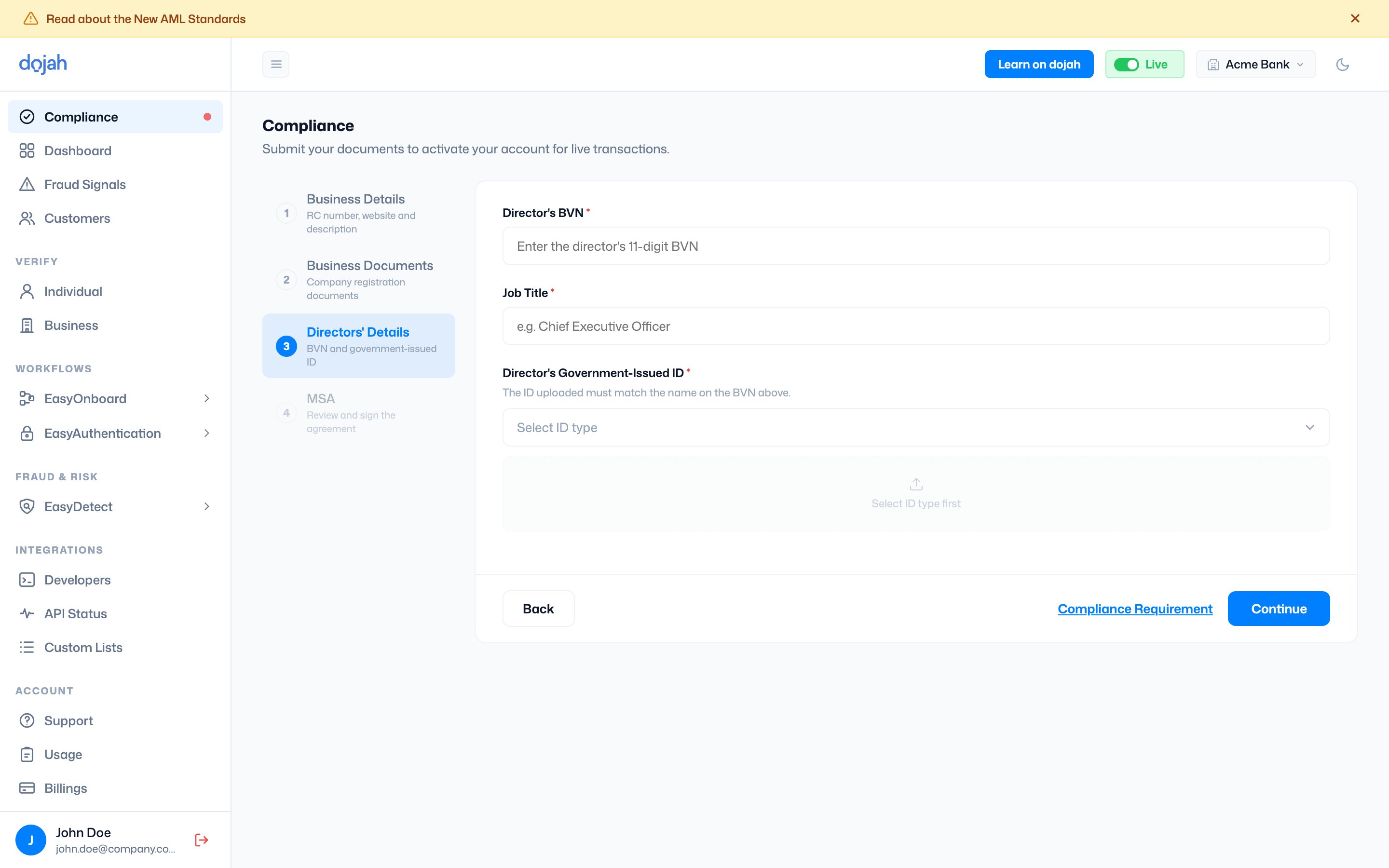
Link a director to the business. Provide their job title and a government-issued ID, then upload it.

| Field                | Required | What it’s for                                                                           |
| -------------------- | -------- | --------------------------------------------------------------------------------------- |
| Job Title            | Yes      | The director’s role, e.g. Chief Executive Officer.                                      |
| Government-Issued ID | Yes      | Choose the ID type (passport, driver’s licence, national ID…) then upload a clear copy. |
<div className="dj-regions">
  <div className="dj-region">
    <div className="dj-region-head">
      <span className="dj-region-flag">🇳🇬</span>
      <span className="dj-region-title">Nigeria</span>
    </div>

    Also enter the director’s 11-digit **BVN** and verify it — Dojah confirms their identity and fills in their name. The uploaded ID **must match the name on the BVN**.
  </div>

  <div className="dj-region">
    <div className="dj-region-head">
      <span className="dj-region-flag">🌍</span>
      <span className="dj-region-title">Other countries</span>
    </div>

    No BVN step — provide the director’s name and job title alongside their government-issued ID.
  </div>
</div>

<img src="https://mintcdn.com/dojah/LZxS1bz_9Y9K9GSQ/images/dashboard-guide/compliance-3-directors.png?fit=max&auto=format&n=LZxS1bz_9Y9K9GSQ&q=85&s=e0b7315a84010e968404cd4f920eccda" alt="Compliance Step 3 — Directors' Details" width="2880" height="1800" data-path="images/dashboard-guide/compliance-3-directors.png" />

## Step 4 — Master Service Agreement

The final step is the **MSA**. Read through the full Master Service Agreement (`Dojah_MSA_v2.1.pdf` — you can download a copy). Then add your **signature**: switch to **Draw** to sign in the box, or **Upload** to attach an image of your signature. Finally, select **Submit for Review** to send your application to Dojah. If your application was previously returned, this button reads **Resubmit**.
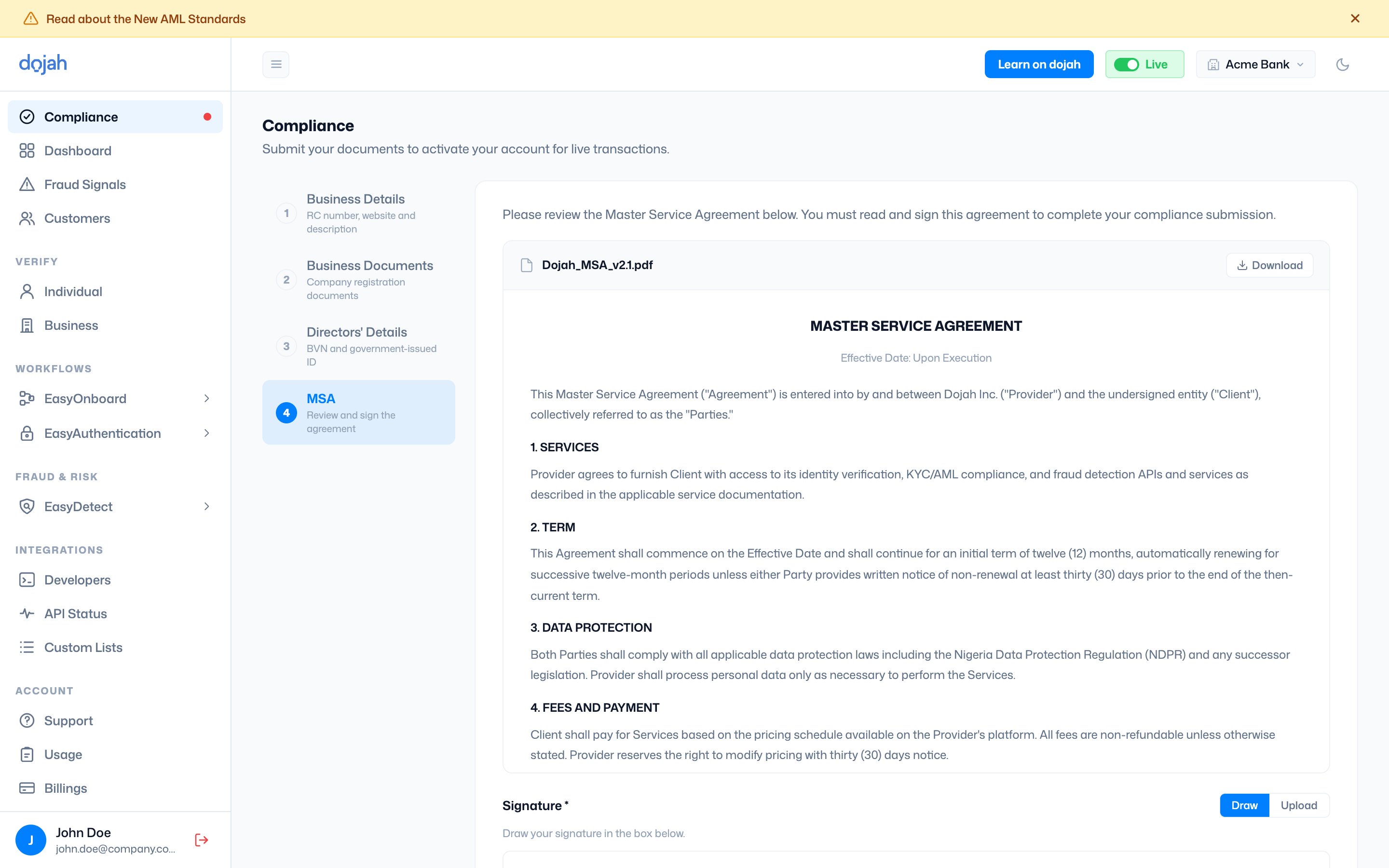
<img src="https://mintcdn.com/dojah/LZxS1bz_9Y9K9GSQ/images/dashboard-guide/compliance-4-msa.png?fit=max&auto=format&n=LZxS1bz_9Y9K9GSQ&q=85&s=a60cc5c7e5f3d1daf287f17dd8d66166" alt="Compliance Step 4 — Master Service Agreement" width="2880" height="1800" data-path="images/dashboard-guide/compliance-4-msa.png" />

## After you submit

Your application moves through three states:

<div className="dj-status-row">
  <span className="dj-status dj-status-review">Under review</span>
  <span className="dj-status dj-status-rejected">Rejected</span>
  <span className="dj-status dj-status-approved">Approved</span>
</div>

| Status       | What it means                                                                                                                                |
| ------------ | -------------------------------------------------------------------------------------------------------------------------------------------- |
| Under review | Dojah’s team is checking your details. You can keep building and testing in sandbox while you wait.                                          |
| Rejected     | Something needs fixing. The application comes back with a reason — update the relevant step and **Resubmit**.                                |
| Approved     | Your account is approved for **live mode**. The Compliance item disappears from the sidebar and you can switch to **Live** from the top bar. |

<Tip>
  **Don’t wait to integrate.** Approval is only required for live traffic. You can build your entire integration and test it end-to-end in sandbox while your compliance review is in progress.
</Tip>

## Frequently asked questions

<AccordionGroup>
  <Accordion title="What documents do I need for Dojah compliance?">
    Nigerian companies provide a **CAC Certificate**, **MEMART** (Memorandum & Articles of Association), a **Status Report**, and a recent **utility bill** (dated within the last 3 months), along with an RC number and a director’s BVN. Companies registered outside Nigeria provide a **Certificate of Incorporation** and a government-issued ID. Every file can be a PDF, JPG, or PNG up to 5 MB.
  </Accordion>

  <Accordion title="Can I test Dojah before completing compliance?">
    Yes. Every new account starts in **sandbox**, which runs on test data and is never billed, so you can build and test your entire integration first. You only need to complete compliance to run **live** verifications against real records — and you can keep working in sandbox while your application is under review.
  </Accordion>

  <Accordion title="How long does compliance approval take?">
    Once you submit, your application goes into **review** by Dojah’s team. If anything needs fixing it comes back as **rejected** with a reason, so you can update the relevant step and resubmit. When it’s approved, your account is switched on for live mode and the Compliance item drops off your sidebar.
  </Accordion>

  <Accordion title="Why won’t my RC number verify?">
    Dojah resolves your **RC number** against the CAC registry to confirm your company. If it fails, check that the number is entered correctly and matches your registered business name. Once it resolves, your Company Name and Company Type are filled in automatically.
  </Accordion>

  <Accordion title="Do businesses outside Nigeria need a BVN?">
    No. The **BVN** step is specific to Nigerian directors. If your business is registered elsewhere, you provide the director’s name, job title, and a government-issued ID instead — no BVN required.
  </Accordion>
</AccordionGroup>
