> ## Documentation Index
> Fetch the complete documentation index at: https://docs.dojah.io/llms.txt
> Use this file to discover all available pages before exploring further.
# Fund your wallet
> Live verifications are charged to your Dojah wallet. Add funds to keep them running, and turn on auto top-up so you never run dry.
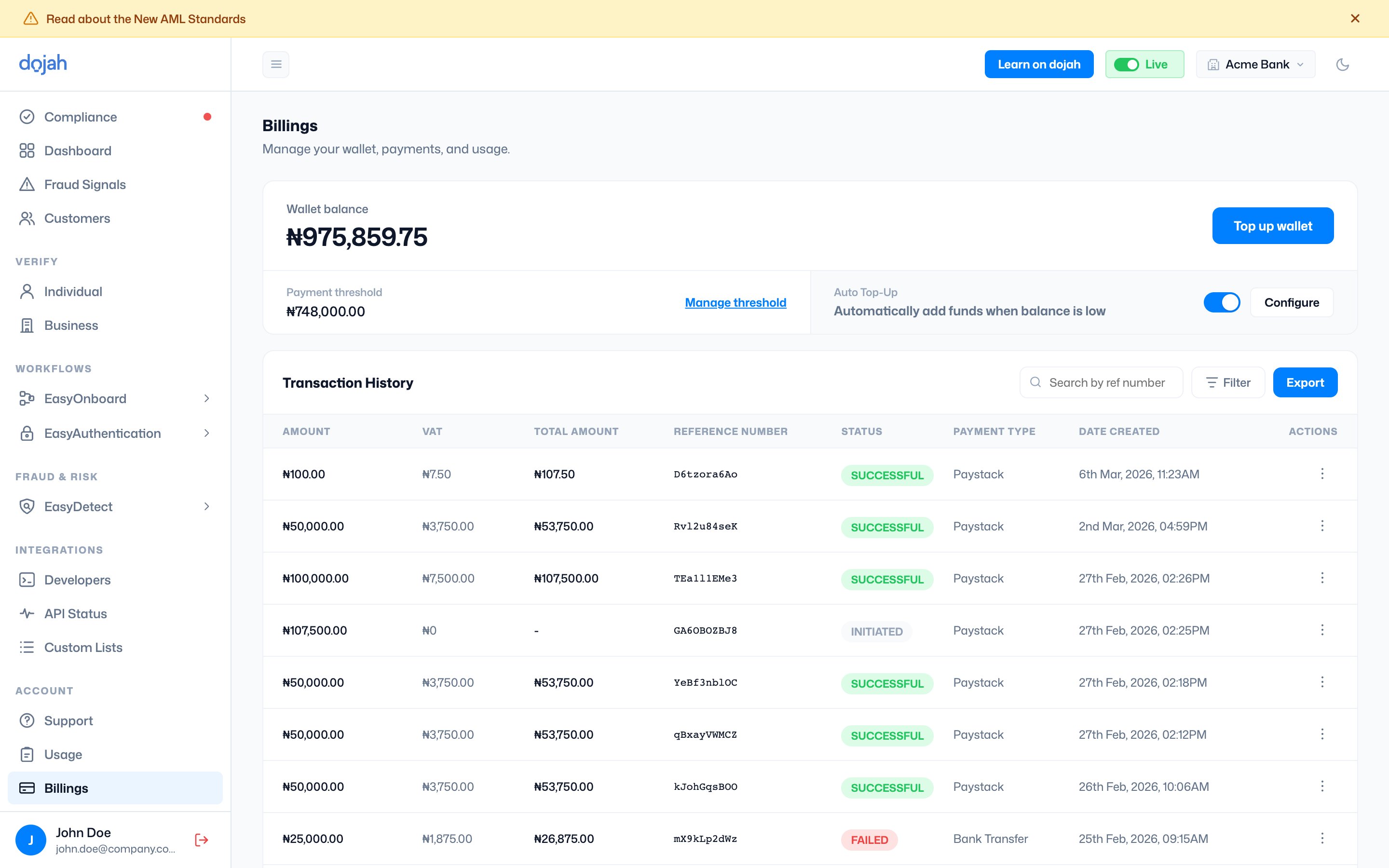
Your **wallet** holds the balance every live request draws from. Each verification is billed per call, so a funded wallet is what keeps live traffic flowing. You can manage it from [Account → Billings](/dashboard-guide/account/billings), where you’ll see your balance, top up, and review your transaction history.
**Sandbox is free.** You only need a funded wallet for **live** verifications. Testing in sandbox never touches your balance.
 ## Top up your wallet
Select **Top up wallet** from the [Billings page](/dashboard-guide/account/billings) (or the dashboard) and follow the steps:
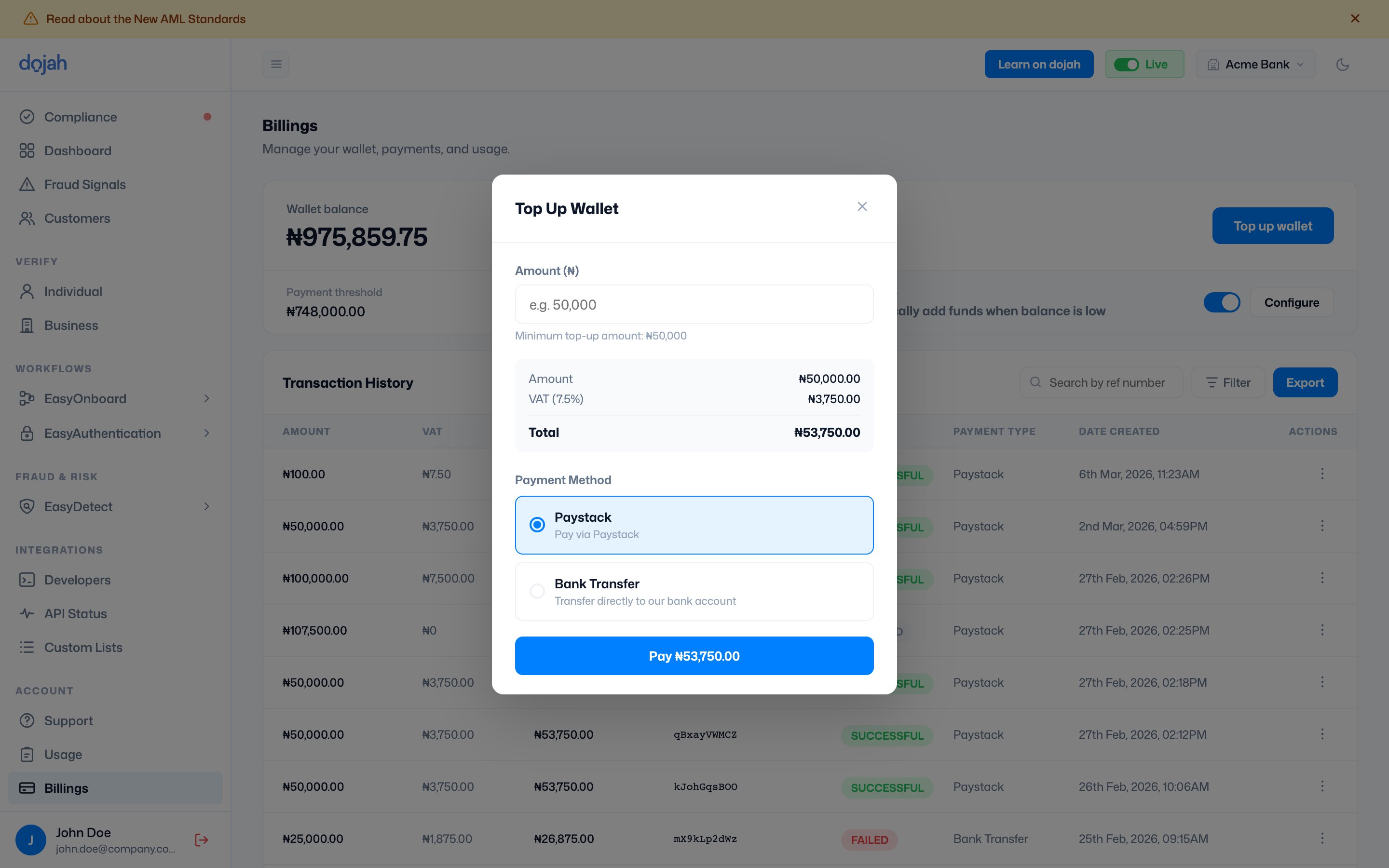
Type how much you’d like to add — the minimum is **₦50,000**. Before you pay, the modal shows a breakdown of your amount, VAT, and the total.
**Paystack** to pay instantly by card, or **Bank Transfer** to send the total to Dojah’s account details shown in the modal.
Complete the payment. Your balance updates as soon as the payment succeeds, and the top-up appears in your transaction history.
## Top up your wallet
Select **Top up wallet** from the [Billings page](/dashboard-guide/account/billings) (or the dashboard) and follow the steps:
Type how much you’d like to add — the minimum is **₦50,000**. Before you pay, the modal shows a breakdown of your amount, VAT, and the total.
**Paystack** to pay instantly by card, or **Bank Transfer** to send the total to Dojah’s account details shown in the modal.
Complete the payment. Your balance updates as soon as the payment succeeds, and the top-up appears in your transaction history.
 ## Auto Top-Up
Rather than topping up by hand, turn on **Auto Top-Up** to add funds automatically whenever your balance runs low — so live verifications never stop for an empty wallet.
| Setting | What it does |
| ------------------ | ---------------------------------------------------------------------- |
| Auto Top-Up toggle | Turns automatic funding on or off. |
| Threshold | The balance that triggers a top-up. Set it under **Manage threshold**. |
| Configure | Set the top-up amount and the saved card used for automatic payments. |
**Tip.** Auto Top-Up needs a saved card on file. Once it’s set, top-ups happen in the background and show up in your transaction history like any other payment.
## Transaction history
Every top-up is recorded under [Billings](/dashboard-guide/account/billings) with its amount, VAT, total, reference number, payment type, and status (**Successful**, **Initiated**, or **Failed**). You can search, filter, and export the list. The full billing breakdown is covered later under [Account → Billings](/dashboard-guide/account/billings).
## Frequently asked questions
The minimum top-up is **₦50,000**. The modal shows your amount, VAT, and total before you pay.
Yes — **7.5% VAT** is applied to each top-up. You’ll see the amount, VAT, and total broken down before you confirm payment.
Pay instantly by card with **Paystack**, or use **Bank Transfer** to send the total to Dojah’s account details shown in the modal.
Auto Top-Up automatically adds funds when your balance drops below a threshold you set, so live verifications never stop for an empty wallet. It uses a saved card on file.
No. Sandbox is free, so you can build and test without any balance. You only need to fund your wallet to run live verifications.
## Auto Top-Up
Rather than topping up by hand, turn on **Auto Top-Up** to add funds automatically whenever your balance runs low — so live verifications never stop for an empty wallet.
| Setting | What it does |
| ------------------ | ---------------------------------------------------------------------- |
| Auto Top-Up toggle | Turns automatic funding on or off. |
| Threshold | The balance that triggers a top-up. Set it under **Manage threshold**. |
| Configure | Set the top-up amount and the saved card used for automatic payments. |
**Tip.** Auto Top-Up needs a saved card on file. Once it’s set, top-ups happen in the background and show up in your transaction history like any other payment.
## Transaction history
Every top-up is recorded under [Billings](/dashboard-guide/account/billings) with its amount, VAT, total, reference number, payment type, and status (**Successful**, **Initiated**, or **Failed**). You can search, filter, and export the list. The full billing breakdown is covered later under [Account → Billings](/dashboard-guide/account/billings).
## Frequently asked questions
The minimum top-up is **₦50,000**. The modal shows your amount, VAT, and total before you pay.
Yes — **7.5% VAT** is applied to each top-up. You’ll see the amount, VAT, and total broken down before you confirm payment.
Pay instantly by card with **Paystack**, or use **Bank Transfer** to send the total to Dojah’s account details shown in the modal.
Auto Top-Up automatically adds funds when your balance drops below a threshold you set, so live verifications never stop for an empty wallet. It uses a saved card on file.
No. Sandbox is free, so you can build and test without any balance. You only need to fund your wallet to run live verifications.