> ## Documentation Index
> Fetch the complete documentation index at: https://docs.dojah.io/llms.txt
> Use this file to discover all available pages before exploring further.
# Getting around the dashboard
> A quick tour of the two things that are always on screen — the top bar you’ll use everywhere, and the sidebar that organizes every feature.
 ## The top bar
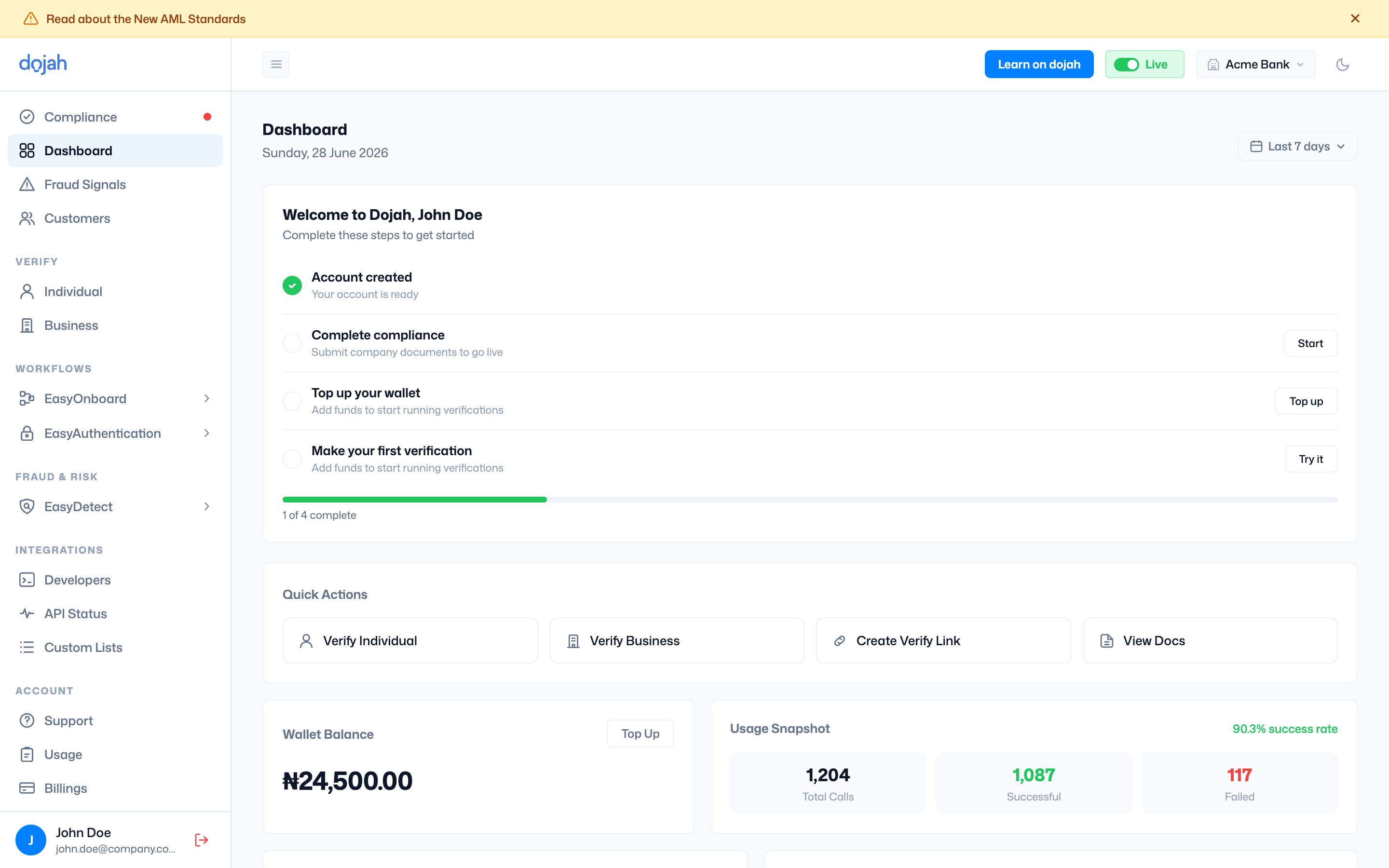
The top bar is where you switch context and get help. From left to right:
| Control | What it does |
| ---------------- | ----------------------------------------------------------------------------------------------------------------------------------------- |
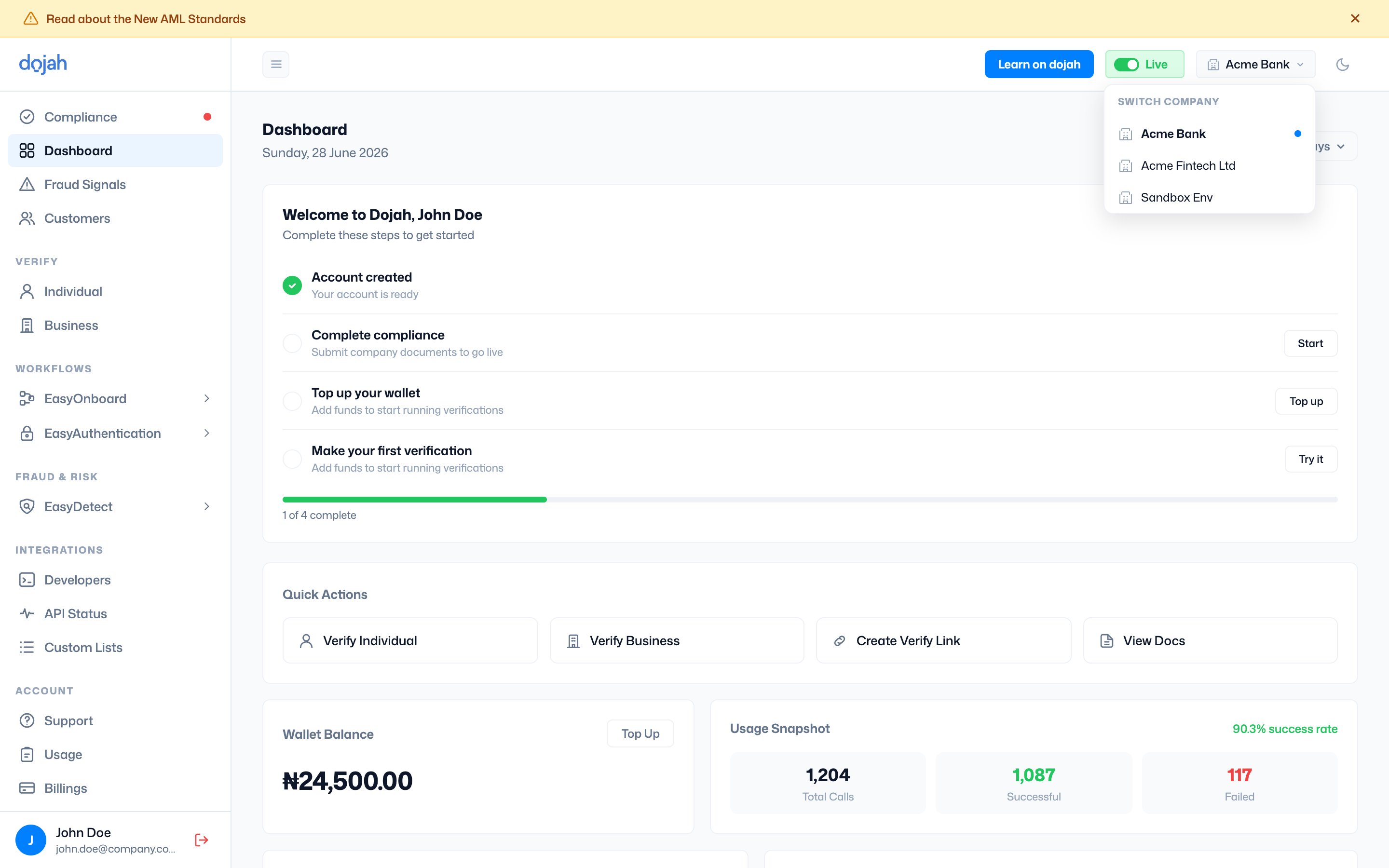
| Company switcher | Switch between the companies you belong to. The active company carries a blue dot. |
| Live / Sandbox | Flip between live and sandbox. You can switch to **Live** only after compliance is approved — until then, you’re prompted to complete it. |
| Theme | Switch between light and dark mode. |
| Profile | Your avatar opens the account menu, including **sign out**. |
### Switching company
If you belong to more than one company, select the company name in the top bar to switch between them. Each company has its own data, wallet, and settings — including a dedicated **Sandbox Env** for testing.
## The top bar
The top bar is where you switch context and get help. From left to right:
| Control | What it does |
| ---------------- | ----------------------------------------------------------------------------------------------------------------------------------------- |
| Company switcher | Switch between the companies you belong to. The active company carries a blue dot. |
| Live / Sandbox | Flip between live and sandbox. You can switch to **Live** only after compliance is approved — until then, you’re prompted to complete it. |
| Theme | Switch between light and dark mode. |
| Profile | Your avatar opens the account menu, including **sign out**. |
### Switching company
If you belong to more than one company, select the company name in the top bar to switch between them. Each company has its own data, wallet, and settings — including a dedicated **Sandbox Env** for testing.
 ### Learn on dojah
The **Learn on dojah** button in the top bar opens Dojah’s learning hub — guides, tutorials, and product walkthroughs — in a new tab.
[Open Learn on dojah ↗](https://dojah.io/learn)
## The sidebar
The sidebar groups every feature so related tools sit together. The groups are:
| Group | What’s inside |
| ------------ | ----------------------------------------------------------------------------------------------------------- |
| Top level | **Compliance** (shown with a red dot until approved), **Dashboard**, **Fraud Signals**, and **Customers**. |
| Verify | **Individual** and **Business** — run one-off verifications. |
| Workflows | **EasyOnboard** (no-code verification flows) and **EasyAuthentication** (fast re-auth for returning users). |
| Fraud & Risk | **EasyDetect** — real-time transaction and fraud monitoring. |
| Integrations | **Developers**, **API Status**, and **Custom Lists**. |
| Account | **Support**, **Usage**, **Billings**, and **Settings**. |
**Tip.** Once compliance is approved, the Compliance item drops off the sidebar — so the nav reflects exactly what your account can do.
## Frequently asked questions
Select the company name in the top bar to open the company switcher. Each company you belong to has its own data, wallet, and settings, including a dedicated sandbox environment.
The **Learn on dojah** button in the top bar opens Dojah’s learning hub at dojah.io/learn in a new tab.
Sandbox runs on test data and is free; Live runs real verifications against actual records and charges your wallet. Switch between them with the toggle in the top bar — Live unlocks once you complete compliance.
### Learn on dojah
The **Learn on dojah** button in the top bar opens Dojah’s learning hub — guides, tutorials, and product walkthroughs — in a new tab.
[Open Learn on dojah ↗](https://dojah.io/learn)
## The sidebar
The sidebar groups every feature so related tools sit together. The groups are:
| Group | What’s inside |
| ------------ | ----------------------------------------------------------------------------------------------------------- |
| Top level | **Compliance** (shown with a red dot until approved), **Dashboard**, **Fraud Signals**, and **Customers**. |
| Verify | **Individual** and **Business** — run one-off verifications. |
| Workflows | **EasyOnboard** (no-code verification flows) and **EasyAuthentication** (fast re-auth for returning users). |
| Fraud & Risk | **EasyDetect** — real-time transaction and fraud monitoring. |
| Integrations | **Developers**, **API Status**, and **Custom Lists**. |
| Account | **Support**, **Usage**, **Billings**, and **Settings**. |
**Tip.** Once compliance is approved, the Compliance item drops off the sidebar — so the nav reflects exactly what your account can do.
## Frequently asked questions
Select the company name in the top bar to open the company switcher. Each company you belong to has its own data, wallet, and settings, including a dedicated sandbox environment.
The **Learn on dojah** button in the top bar opens Dojah’s learning hub at dojah.io/learn in a new tab.
Sandbox runs on test data and is free; Live runs real verifications against actual records and charges your wallet. Switch between them with the toggle in the top bar — Live unlocks once you complete compliance.