> ## Documentation Index
> Fetch the complete documentation index at: https://docs.dojah.io/llms.txt
> Use this file to discover all available pages before exploring further.
# API Status
> See the real-time health of every Dojah service — KYC, KYB, and messaging — with per-service status, recent uptime, and incident banners.
The **API Status** page shows whether Dojah’s services are running normally. When a verification is failing, it’s the first place to check: it tells you at a glance whether the issue is on Dojah’s side and which specific service is affected.
**Service health, not your integration.** This page reflects the health of Dojah’s own services. If a check is failing only for you while the service shows **ONLINE**, the cause is more likely your request or balance — check the response code in [Usage](/dashboard-guide/account/usage), or reach the team via [Support](/dashboard-guide/account/support).
## The status banner
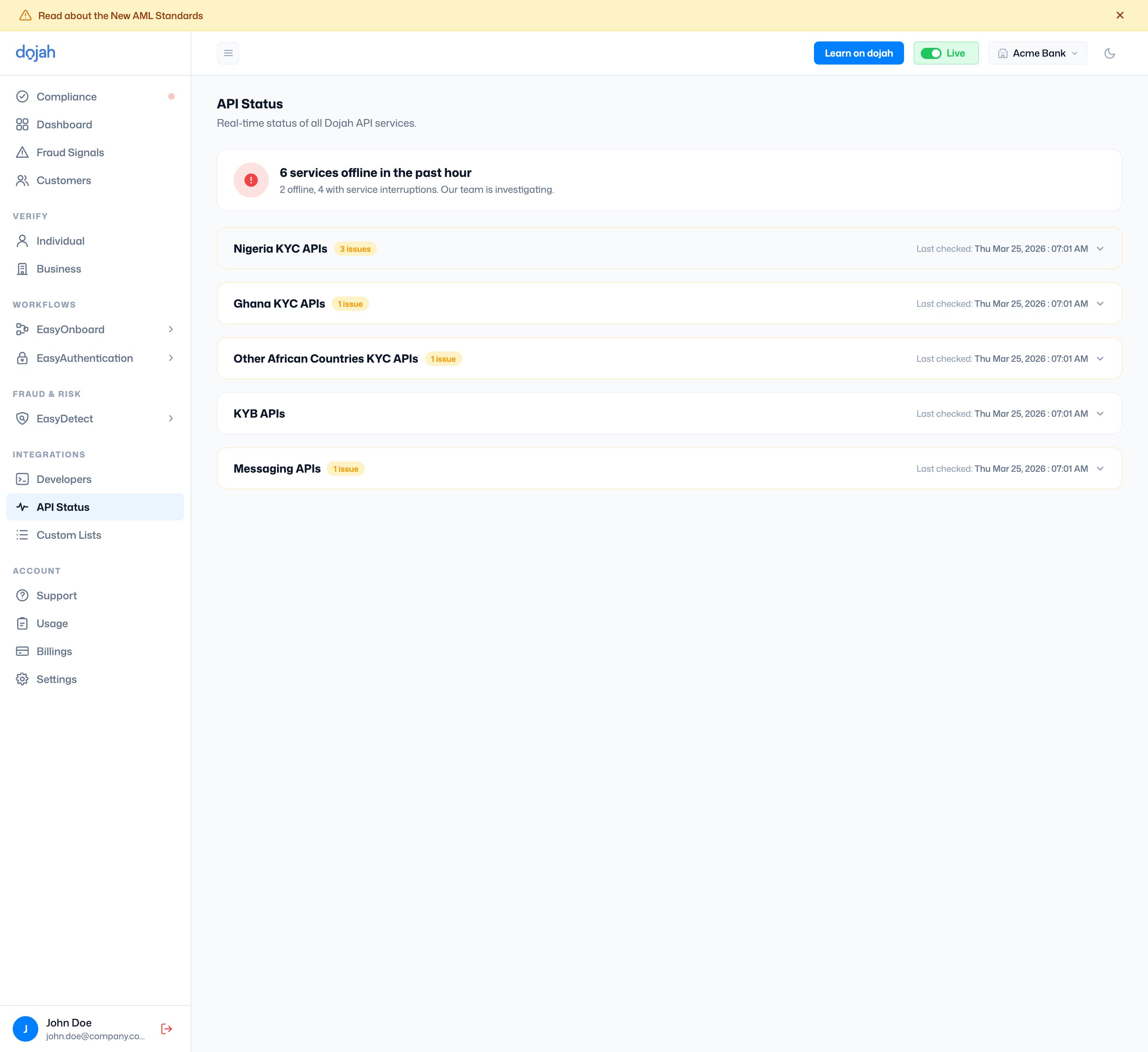
At the top of the page, a banner summarises overall health. When everything is healthy it reads **All systems operational**. When one or more services are down, it switches to a count — for example *“6 services offline in the past hour”* — with a short breakdown of how many are offline versus experiencing interruptions.
 ## Service categories
Services are grouped into collapsible categories. Each header shows an **issue count** if any of its services are affected, and a **Last checked** timestamp. Click a category to expand it and see the services inside.
* **Nigeria KYC APIs** — identity checks for Nigeria (BVN, NIN, CAC, and more).
* **Ghana KYC APIs** — identity checks for Ghana (Ghana Card, Passport, and more).
* **Other African Countries KYC APIs** — checks for Kenya, South Africa, Uganda, and others.
* **KYB APIs** — business verification (CAC Basic, CAC Advanced, TIN Lookup).
* **Messaging APIs** — OTP delivery over SMS, WhatsApp, and Email.
## Reading a service’s status
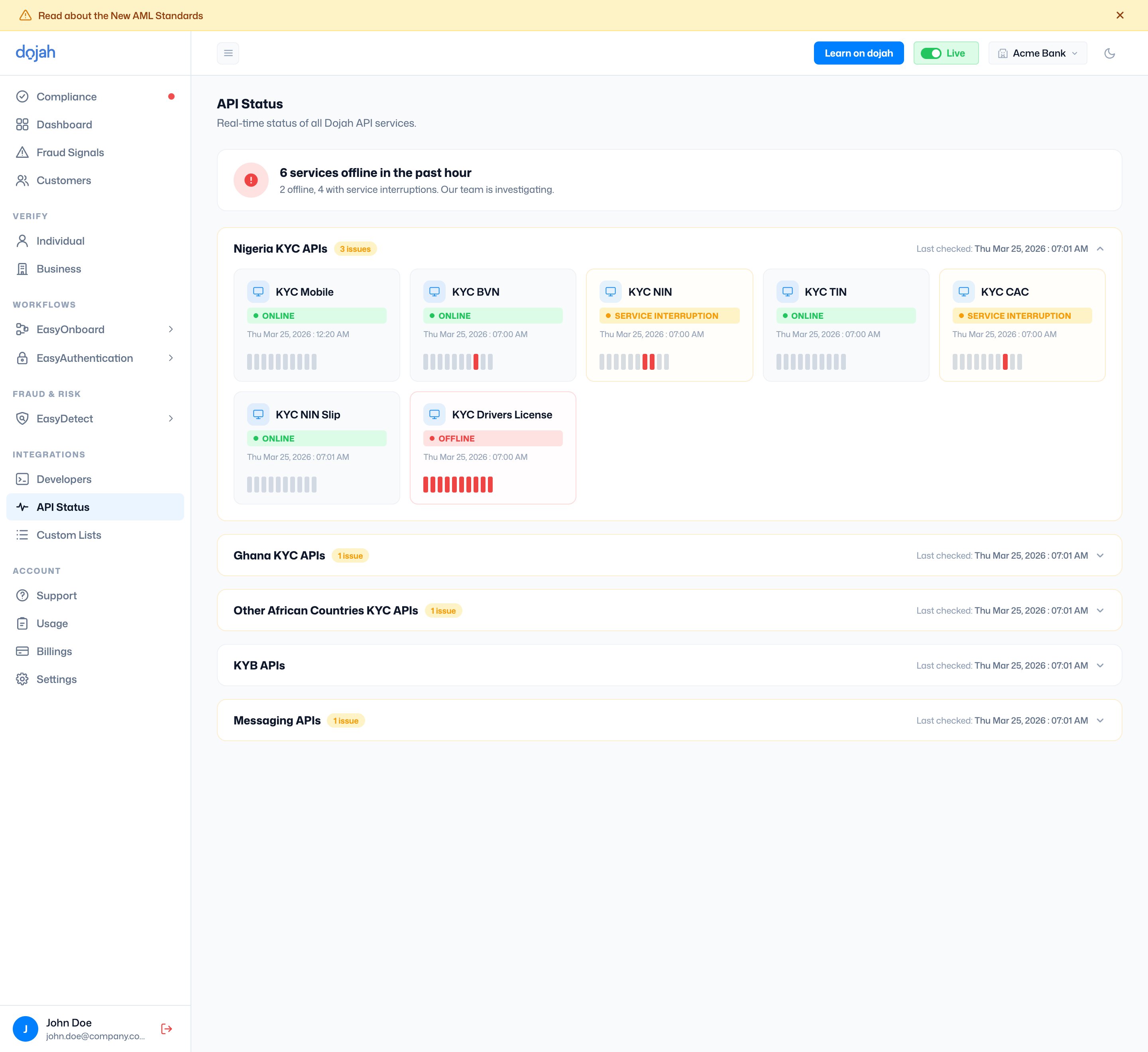
Expanding a category reveals a card for each service. The card shows the service’s current status, when it was last updated, and a short strip of recent uptime.
## Service categories
Services are grouped into collapsible categories. Each header shows an **issue count** if any of its services are affected, and a **Last checked** timestamp. Click a category to expand it and see the services inside.
* **Nigeria KYC APIs** — identity checks for Nigeria (BVN, NIN, CAC, and more).
* **Ghana KYC APIs** — identity checks for Ghana (Ghana Card, Passport, and more).
* **Other African Countries KYC APIs** — checks for Kenya, South Africa, Uganda, and others.
* **KYB APIs** — business verification (CAC Basic, CAC Advanced, TIN Lookup).
* **Messaging APIs** — OTP delivery over SMS, WhatsApp, and Email.
## Reading a service’s status
Expanding a category reveals a card for each service. The card shows the service’s current status, when it was last updated, and a short strip of recent uptime.
 | On the card | What it shows |
| ------------ | ------------------------------------------------------------------------------------ |
| Service | The name of the API or check, e.g. **KYC BVN**, **GH Passport**, or **SMS OTP**. |
| Status badge | The service’s current state — **Online**, **Service Interruption**, or **Offline**. |
| Timestamp | When that service’s status was last updated. |
| Uptime bars | A short strip of recent history. A red bar marks a period when the service was down. |
### What the statuses mean
| Status | Meaning |
| ----------------------- | ------------------------------------------------------------------------------------------- |
| 🟢 Online | The service is operating normally. |
| 🟡 Service Interruption | The service is up but experiencing intermittent issues — some requests may fail or be slow. |
| 🔴 Offline | The service is currently unavailable. Dojah’s team is notified and investigating. |
## Frequently asked questions
Open **API Status** under **Integrations** in the dashboard. The banner at the top tells you whether all systems are operational, and each service category shows the status of its individual services. Expand a category to find the specific check you’re using.
**Online** means the service is running normally. **Service Interruption** means it’s up but having intermittent issues, so some requests may fail or be slow. **Offline** means it’s currently unavailable and Dojah’s team is investigating.
They’re a recent uptime history for that service. A **red** bar marks a period when the service was down, so a card with red bars had a recent outage even if it’s back online now.
An **Offline** status means the issue is on Dojah’s side, and the team is already investigating — there’s nothing to fix in your integration. Retry once the service returns to **Online**. If a check is failing for you but API Status shows the service is **Online**, check the response code in [Usage](/dashboard-guide/account/usage) or reach out via [Support](/dashboard-guide/account/support).
| On the card | What it shows |
| ------------ | ------------------------------------------------------------------------------------ |
| Service | The name of the API or check, e.g. **KYC BVN**, **GH Passport**, or **SMS OTP**. |
| Status badge | The service’s current state — **Online**, **Service Interruption**, or **Offline**. |
| Timestamp | When that service’s status was last updated. |
| Uptime bars | A short strip of recent history. A red bar marks a period when the service was down. |
### What the statuses mean
| Status | Meaning |
| ----------------------- | ------------------------------------------------------------------------------------------- |
| 🟢 Online | The service is operating normally. |
| 🟡 Service Interruption | The service is up but experiencing intermittent issues — some requests may fail or be slow. |
| 🔴 Offline | The service is currently unavailable. Dojah’s team is notified and investigating. |
## Frequently asked questions
Open **API Status** under **Integrations** in the dashboard. The banner at the top tells you whether all systems are operational, and each service category shows the status of its individual services. Expand a category to find the specific check you’re using.
**Online** means the service is running normally. **Service Interruption** means it’s up but having intermittent issues, so some requests may fail or be slow. **Offline** means it’s currently unavailable and Dojah’s team is investigating.
They’re a recent uptime history for that service. A **red** bar marks a period when the service was down, so a card with red bars had a recent outage even if it’s back online now.
An **Offline** status means the issue is on Dojah’s side, and the team is already investigating — there’s nothing to fix in your integration. Retry once the service returns to **Online**. If a check is failing for you but API Status shows the service is **Online**, check the response code in [Usage](/dashboard-guide/account/usage) or reach out via [Support](/dashboard-guide/account/support).