> ## Documentation Index
> Fetch the complete documentation index at: https://docs.dojah.io/llms.txt
> Use this file to discover all available pages before exploring further.
# Individual Verification
> Verify and manage individual identities across multiple countries — government ID lookups, address checks, credit reports, AML screening, and document analysis, one at a time or in bulk.
**Individual Verification** is where you run identity checks on a person and review the results. The page has three parts: the [history](#verification-history) of every lookup you’ve run, the [New Lookup](#running-a-lookup) form for running a fresh check, and the [result](#reading-a-result) view for each verification.
**Verifications and customers.** Each lookup can be attached to a customer — either a new one or an existing record you link on the form. Results then roll up into the person’s profile on the [Customers](/dashboard-guide/home/customers) page, so you build one identity over time instead of scattered checks.
## Verification types
Dojah offers five kinds of individual check. Which ones are available depends on the **country** you choose — AML Screening and Document Analysis work everywhere, while the others cover Nigeria and a set of other countries.
| Type | What it does | Where |
| -------------------- | --------------------------------------------------------------------------------------------------------------- | ----------------------------- |
| Government Lookup | Checks a government-issued ID — NIN, BVN, passport, driver’s licence, and more — against the official registry. | 🌍 Nigeria & select countries |
| Address Verification | Confirms a physical address, with field-agent photos of the location. | 🇳🇬 Nigeria |
| Credit Check | Pulls a credit report — score, loan summary, and behavioural analysis — from a BVN. | 🇳🇬 Nigeria |
| AML Screening | Screens a person against global watchlists, sanctions, PEP, and adverse-media databases. | 🌍 All countries |
| Document Analysis | Analyses an uploaded ID document (front and back) to read and validate it. | 🌍 All countries |
## Running a lookup
Select **+ New Lookup** to open the form. Choose your **Country**, the **App Name** to record the lookup under, and the **Verification Type** — the form then shows the fields that check needs. For a Government Lookup, for example, you pick an **ID Type** and enter the **ID Number**.
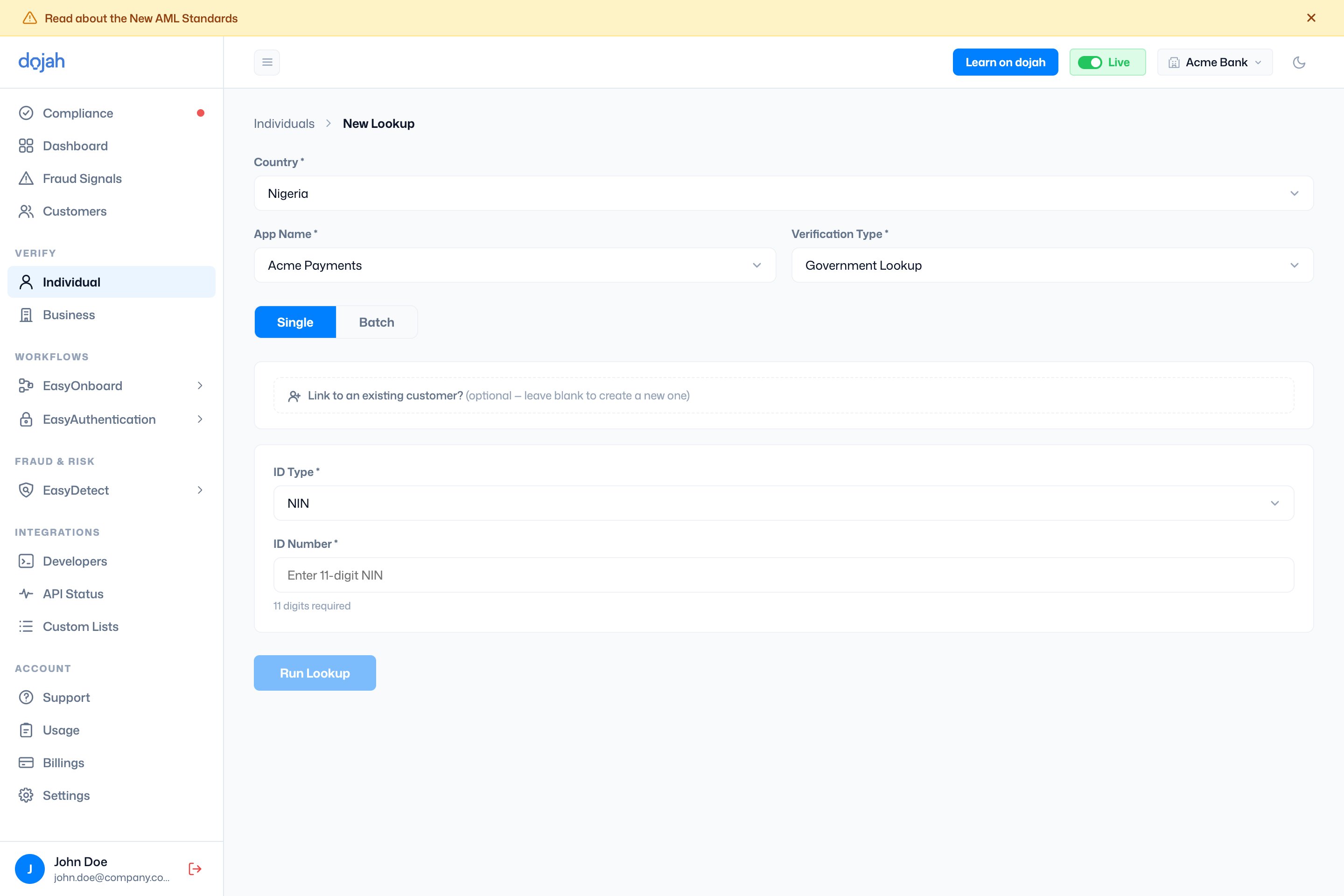 | Step | What it does |
| ---------------------------- | ----------------------------------------------------------------------------------------------------------------------------------- |
| Country | The country whose registries you’re checking. This decides which verification types and ID types are available. |
| App Name | The app the lookup is recorded under. |
| Verification Type | Which of the five checks to run. The fields below change to match. |
| Single / Batch | **Single** runs one lookup; **Batch** lets you upload a CSV to run many at once (give the batch a name so you can find them later). |
| Link to an existing customer | Optional. Attach this result to a customer you already have — leave blank to create a new one. |
The submit button names itself for the check — **Run Lookup**, **Submit Address**, **Perform Search**, or **Upload** — and becomes available once the required fields are filled.
**Verifying many people at once.** Switch to **Batch**, name the batch, and upload a CSV (a template is provided). Track batch progress from the **Batches** button on the history view.
## Verification history
The default view lists everything you’ve run, split into four tabs — one per result type. Each tab opens with its own headline counts and a table you can **Search**, **Filter**, and **Export**.
| Step | What it does |
| ---------------------------- | ----------------------------------------------------------------------------------------------------------------------------------- |
| Country | The country whose registries you’re checking. This decides which verification types and ID types are available. |
| App Name | The app the lookup is recorded under. |
| Verification Type | Which of the five checks to run. The fields below change to match. |
| Single / Batch | **Single** runs one lookup; **Batch** lets you upload a CSV to run many at once (give the batch a name so you can find them later). |
| Link to an existing customer | Optional. Attach this result to a customer you already have — leave blank to create a new one. |
The submit button names itself for the check — **Run Lookup**, **Submit Address**, **Perform Search**, or **Upload** — and becomes available once the required fields are filled.
**Verifying many people at once.** Switch to **Batch**, name the batch, and upload a CSV (a template is provided). Track batch progress from the **Batches** button on the history view.
## Verification history
The default view lists everything you’ve run, split into four tabs — one per result type. Each tab opens with its own headline counts and a table you can **Search**, **Filter**, and **Export**.
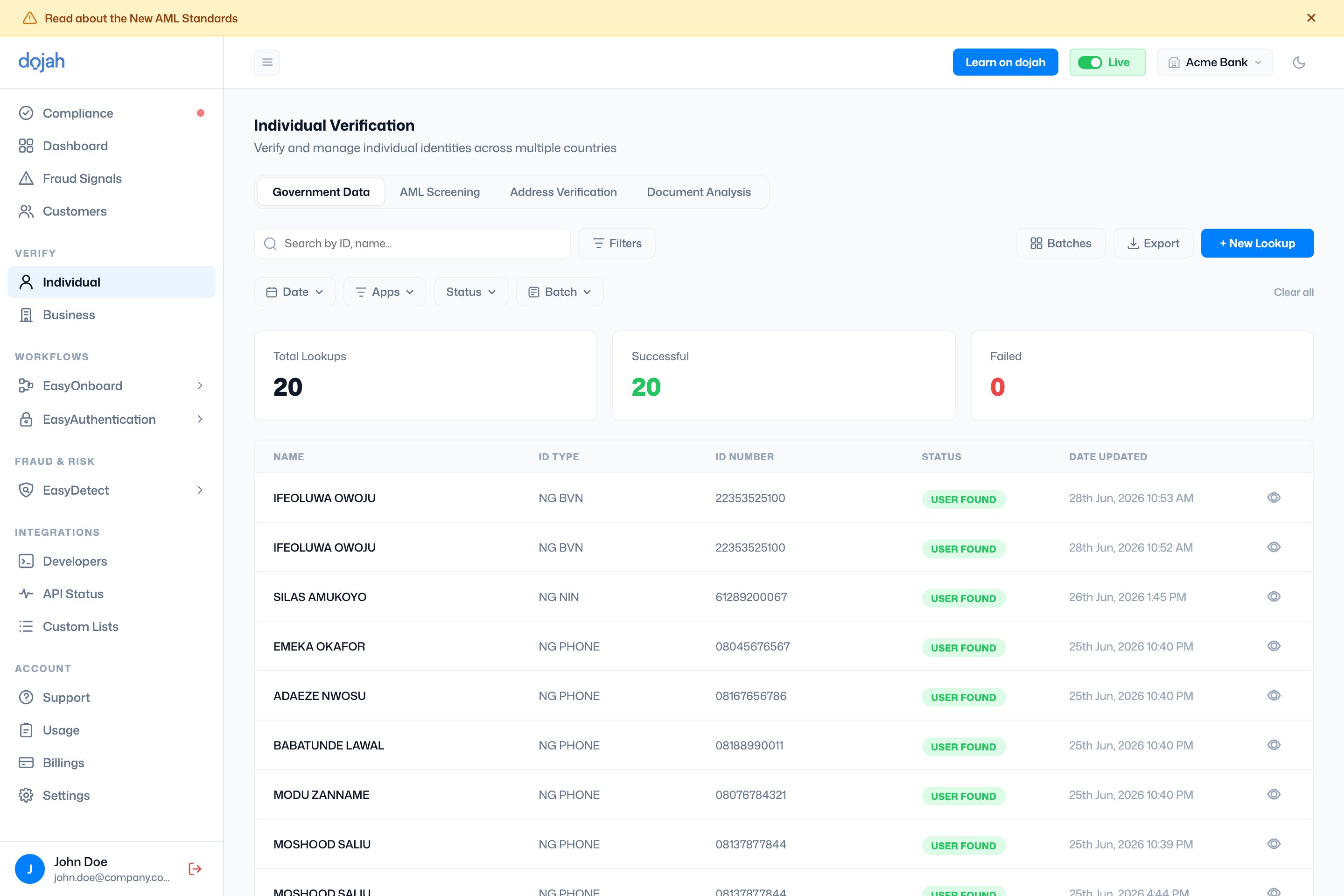 | Tab | Lists | Key columns |
| -------------------- | -------------------------- | --------------------------------------------------------- |
| Government Data | Government Lookup results. | Name · ID Type · ID Number · Status · Date Updated |
| AML Screening | AML screenings. | Name · Risk Level · Result · Status · Entity · Monitoring |
| Address Verification | Address checks. | Reference · Name · Phone Number · Status · Date Created |
| Document Analysis | Document analyses. | Name · ID Type · Status · Date Uploaded |
Status reads differently per check — a Government Lookup shows **User Found** or **User Not Found**; an address check moves through **Pending**, **Completed**, **Failed**, or **Cancelled**; an AML case shows its match status and risk level.
## Reading a result
Open a verification to see the full result. The header shows the person’s photo, name, an overall status (**Verified**, **Pending**, or **All Failed**), and how many checks are attached. Down the left is a summary sidebar; the main panel has a tab per verification.
| Tab | Lists | Key columns |
| -------------------- | -------------------------- | --------------------------------------------------------- |
| Government Data | Government Lookup results. | Name · ID Type · ID Number · Status · Date Updated |
| AML Screening | AML screenings. | Name · Risk Level · Result · Status · Entity · Monitoring |
| Address Verification | Address checks. | Reference · Name · Phone Number · Status · Date Created |
| Document Analysis | Document analyses. | Name · ID Type · Status · Date Uploaded |
Status reads differently per check — a Government Lookup shows **User Found** or **User Not Found**; an address check moves through **Pending**, **Completed**, **Failed**, or **Cancelled**; an AML case shows its match status and risk level.
## Reading a result
Open a verification to see the full result. The header shows the person’s photo, name, an overall status (**Verified**, **Pending**, or **All Failed**), and how many checks are attached. Down the left is a summary sidebar; the main panel has a tab per verification.
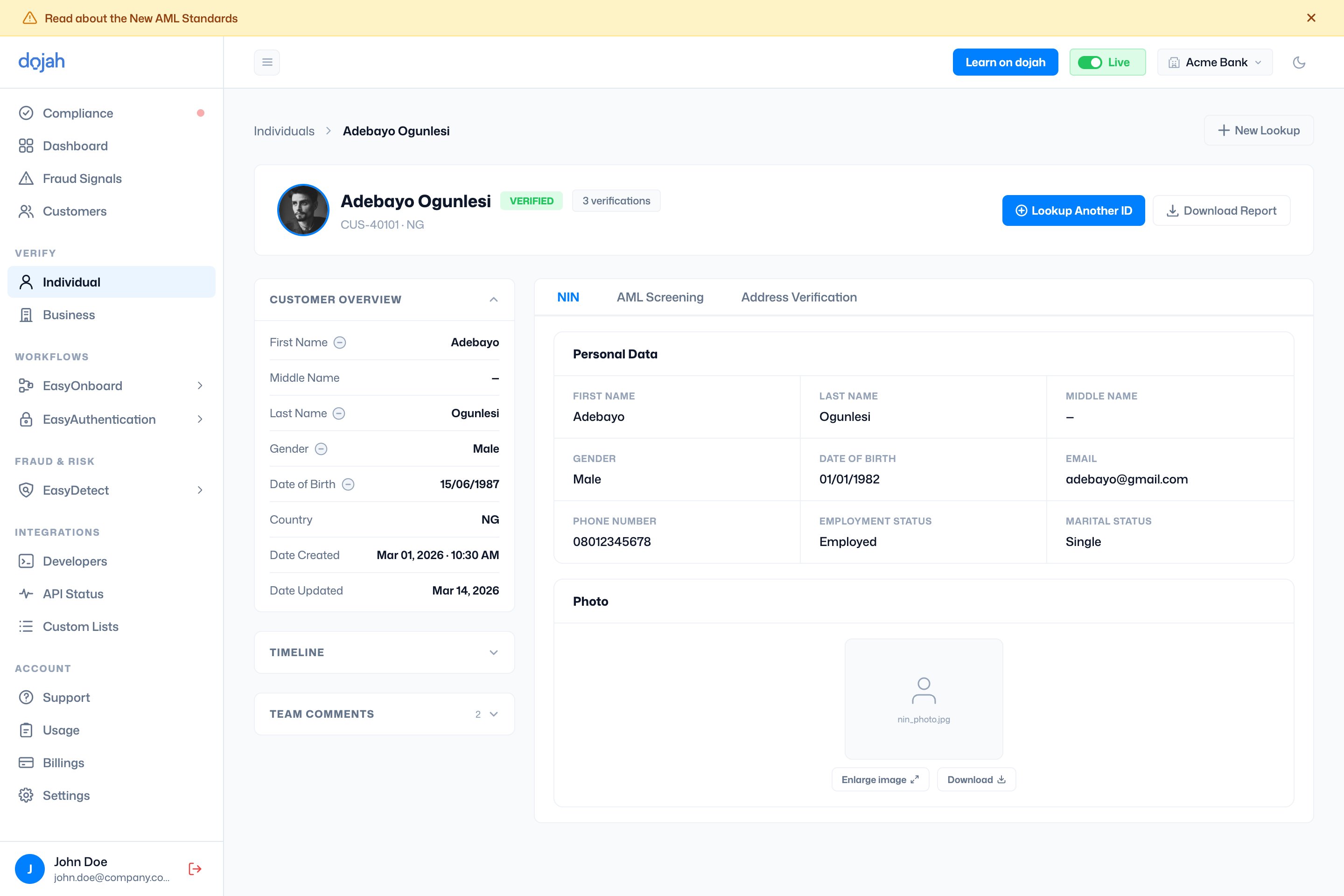 | Sidebar section | What it shows |
| ----------------- | ----------------------------------------------------------------------------------------------------------------------------------------------------------- |
| Customer Overview | The identity fields gathered — name, gender, date of birth, country — with a check that flags where they match or differ across the person’s verifications. |
| Case Info | For AML Screening only: the case ID, match score, risk level, and assignee. Risk level and assignee are editable so you can work the case. |
| Timeline | A step-by-step log of how the verification ran. |
| Team Comments | Notes from your team — add your own to keep a record on the case. |
Each **verification tab** shows that check’s data: a Government Lookup lists the returned personal data and photo; AML Screening lists any watchlist matches; a Credit Check breaks down into **Credit Score**, **Credit Summary**, and **Behavioral Analysis**. A failed check shows the error and a **Retry This Lookup** button instead.
Use **Download Report** to export the result as a PDF — you can choose which verifications to include — or **Lookup Another ID** to run a new check for the same person.
## Frequently asked questions
Go to **Verify → Individual** and select **+ New Lookup**. Choose the country, the app to record it under, and the verification type, then fill in the details (for example an ID type and number for a Government Lookup) and run it. The result appears in your history and on the person’s customer profile.
It depends on the country. In Nigeria you can verify **NIN**, **BVN**, phone number, driver’s licence, voter’s card, passport, and TIN; other countries have their own national IDs and passports. The available ID types appear once you pick a country and choose **Government Lookup**.
**Government Lookup** checks an ID against an official registry; **Address Verification** confirms a physical address; **Credit Check** pulls a credit report from a BVN; **AML Screening** screens against sanctions, PEP, and watchlists; and **Document Analysis** reads and validates an uploaded ID document. AML Screening and Document Analysis are available in every country.
On the New Lookup form, switch from **Single** to **Batch**, give the batch a name, and upload a CSV (a template is provided). Each batch runs as a group, and you can track progress and find past uploads from the **Batches** button on the history view.
Yes. Open the result and select **Download Report**. When a person has more than one verification, you can choose which ones to include before exporting the PDF.
| Sidebar section | What it shows |
| ----------------- | ----------------------------------------------------------------------------------------------------------------------------------------------------------- |
| Customer Overview | The identity fields gathered — name, gender, date of birth, country — with a check that flags where they match or differ across the person’s verifications. |
| Case Info | For AML Screening only: the case ID, match score, risk level, and assignee. Risk level and assignee are editable so you can work the case. |
| Timeline | A step-by-step log of how the verification ran. |
| Team Comments | Notes from your team — add your own to keep a record on the case. |
Each **verification tab** shows that check’s data: a Government Lookup lists the returned personal data and photo; AML Screening lists any watchlist matches; a Credit Check breaks down into **Credit Score**, **Credit Summary**, and **Behavioral Analysis**. A failed check shows the error and a **Retry This Lookup** button instead.
Use **Download Report** to export the result as a PDF — you can choose which verifications to include — or **Lookup Another ID** to run a new check for the same person.
## Frequently asked questions
Go to **Verify → Individual** and select **+ New Lookup**. Choose the country, the app to record it under, and the verification type, then fill in the details (for example an ID type and number for a Government Lookup) and run it. The result appears in your history and on the person’s customer profile.
It depends on the country. In Nigeria you can verify **NIN**, **BVN**, phone number, driver’s licence, voter’s card, passport, and TIN; other countries have their own national IDs and passports. The available ID types appear once you pick a country and choose **Government Lookup**.
**Government Lookup** checks an ID against an official registry; **Address Verification** confirms a physical address; **Credit Check** pulls a credit report from a BVN; **AML Screening** screens against sanctions, PEP, and watchlists; and **Document Analysis** reads and validates an uploaded ID document. AML Screening and Document Analysis are available in every country.
On the New Lookup form, switch from **Single** to **Batch**, give the batch a name, and upload a CSV (a template is provided). Each batch runs as a group, and you can track progress and find past uploads from the **Batches** button on the history view.
Yes. Open the result and select **Download Report**. When a person has more than one verification, you can choose which ones to include before exporting the PDF.