> ## Documentation Index
> Fetch the complete documentation index at: https://docs.dojah.io/llms.txt
> Use this file to discover all available pages before exploring further.
# Workflows
> Create and edit reusable onboarding flows in the no-code builder — branding, verification steps, fraud rules, settings, and integration.
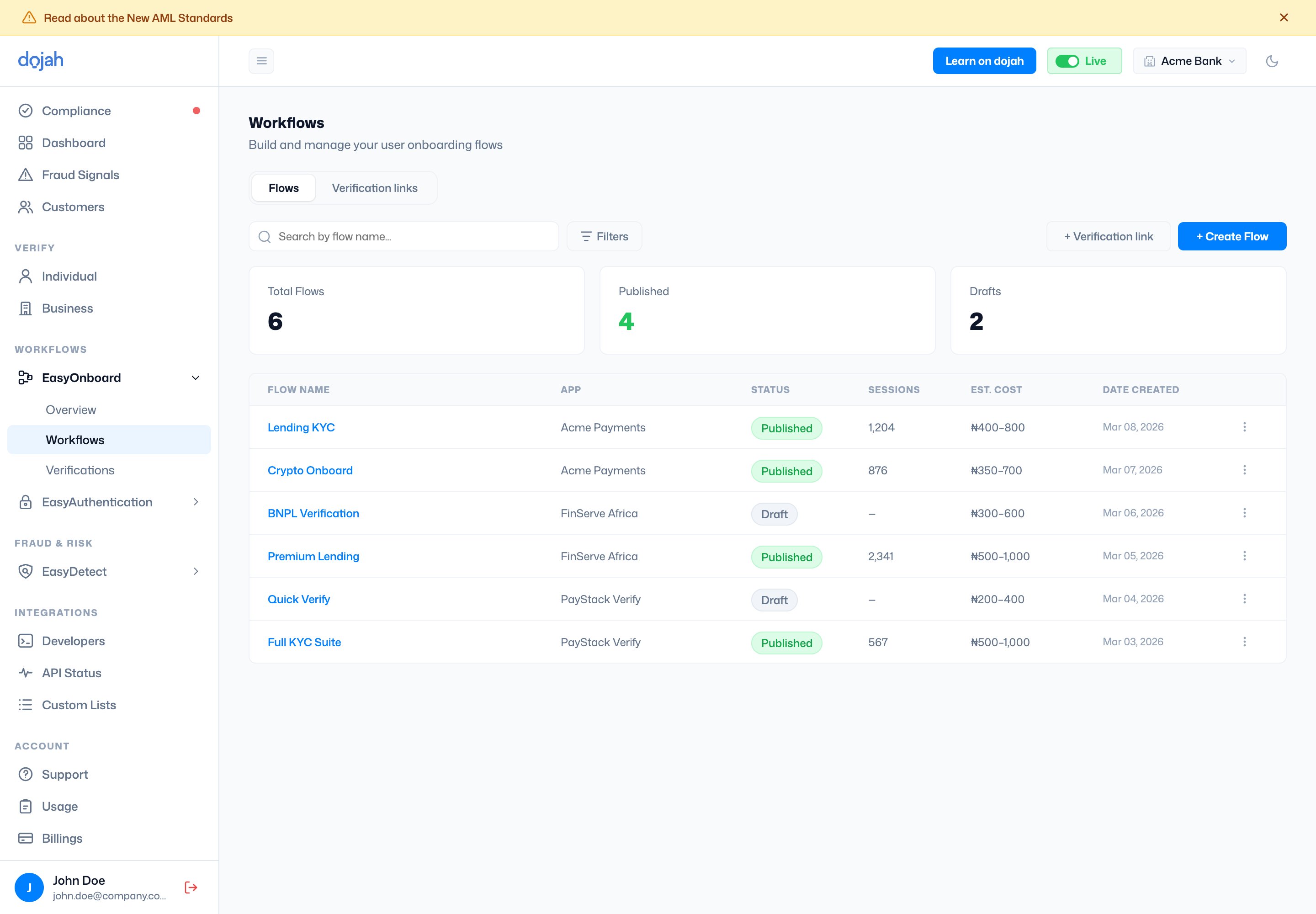
A **workflow** is a reusable onboarding flow. The list shows each workflow’s app, status (**Published** or **Draft**), session count, estimated cost, and creation date. Select **+ Create Flow** to start a new one — from a pre-built **template** (Lending, Crypto, Digital Biz, BNPL) or from scratch. A second tab, **Verification links**, tracks individual links you’ve shared.
 A workflow is tied to an **app** — its branding and verification data run under that app’s keys. Pick the app when you create the flow. See [Apps](/dashboard-guide/integrations/developers#apps) for how apps work.
## The workflow builder
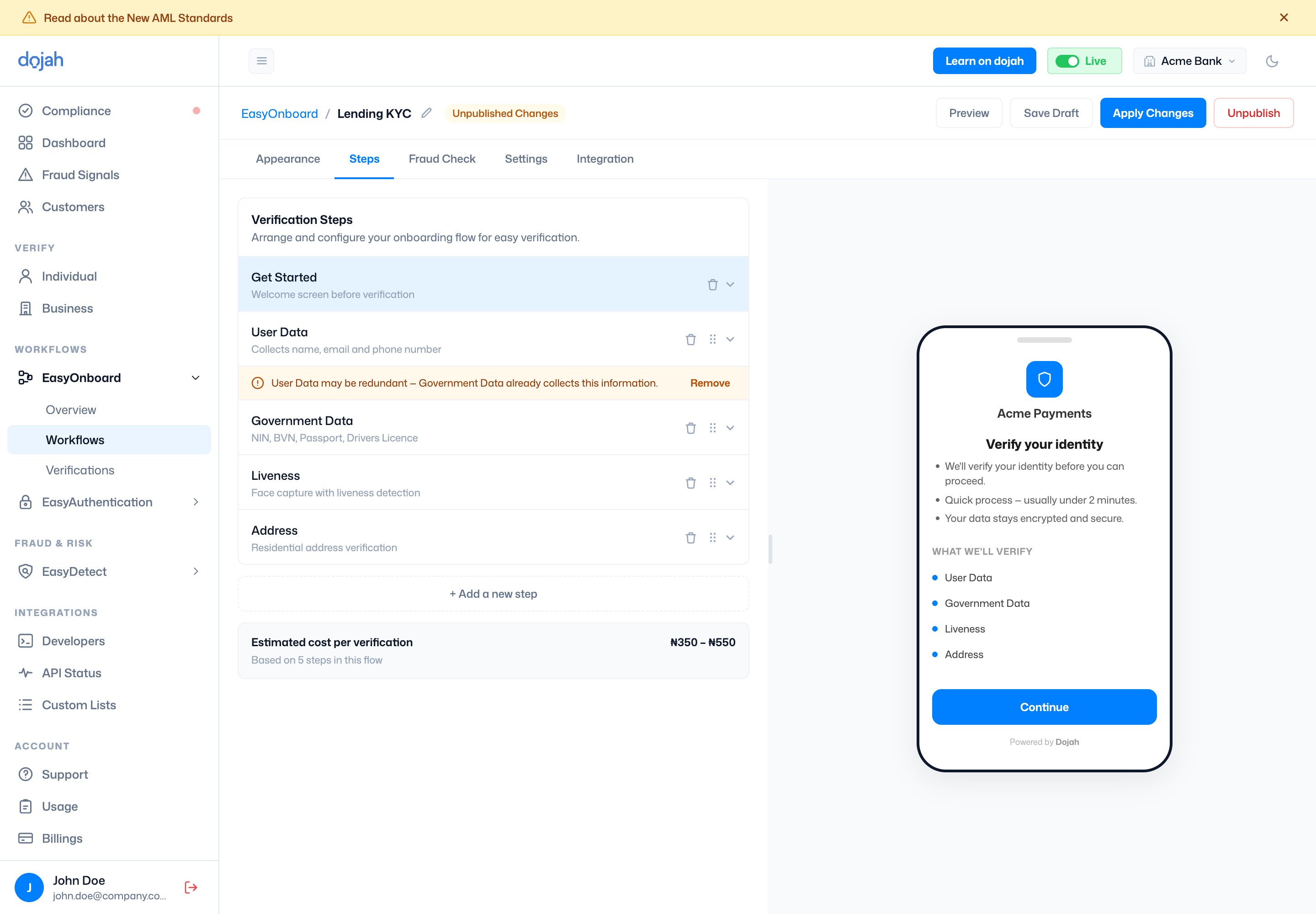
Open a workflow to edit it in the **builder** — a two-panel view with a live phone preview on the right, so you see exactly what users will. Work is organised across five tabs: [Appearance](#appearance), [Steps](#steps), [Fraud Check](#fraud-check), [Settings](#settings), and [Integration](#integration). Save your work as a **Draft** and **Publish** when it’s ready.
A workflow is tied to an **app** — its branding and verification data run under that app’s keys. Pick the app when you create the flow. See [Apps](/dashboard-guide/integrations/developers#apps) for how apps work.
## The workflow builder
Open a workflow to edit it in the **builder** — a two-panel view with a live phone preview on the right, so you see exactly what users will. Work is organised across five tabs: [Appearance](#appearance), [Steps](#steps), [Fraud Check](#fraud-check), [Settings](#settings), and [Integration](#integration). Save your work as a **Draft** and **Publish** when it’s ready.
 ### Appearance
Brands the widget so it matches your product. Settings here drive the live preview.
| Setting | What it controls |
| -------------------- | ----------------------------------------------------------------------------- |
| Branding | The linked app, a logo (PNG, SVG, or JPG, up to 2 MB), and your brand colour. |
| Display Name | The name shown at the top of the widget. |
| Font | The widget font — e.g. Inter, DM Sans, Manrope, Poppins, Lato, or Roboto. |
| Button Border Radius | The roundness of buttons, from square to pill. |
### Steps
The verification steps in the flow, in order. Add them from a catalogue:
| Step | What it collects |
| -------------------- | -------------------------------------------------------------- |
| Get Started | A welcome screen shown before verification begins. |
| User Data | Name, email, and phone number. |
| Government Data | A government ID lookup — NIN, BVN, passport, driver’s licence. |
| Government Issued ID | Capture and verification of an ID document. |
| Liveness | A selfie with liveness detection to confirm a real person. |
| Address | Residential address verification. |
| Email | Email verification by one-time password. |
| Questions | Your own custom questions (open, single-, or multiple-choice). |
Each step shows its own cost, and the builder totals an **estimated cost per verification** as you go.
### Fraud Check
Under **Fraud Rules** you switch on checks that watch for suspicious activity as a user goes through the flow. Each rule is toggled on or off, and you choose what happens when it triggers — **Pending** (flag the session for your review) or **Fail** (reject it automatically).
| Fraud rule | What it checks |
| --------------------- | ------------------------------------------------------------------------------------------------------------------------------------------------------ |
| User Data | Whether the name and date of birth are consistent across data sources. |
| Age Limit | Flags users below a minimum age you set. |
| Liveness Check | Compares the selfie against the submitted ID photo, with liveness-score and image-match thresholds. |
| AML Screening | Screens against sanctions and PEP databases — choose which lists (**PEP**, **Adverse Media**, **Sanctions**, **Warning**) and a match-score threshold. |
| Duplicate ID | Blocks reuse of the same ID number or face across verifications. |
| IP / Device Screening | Flags suspicious devices, VPNs, or proxies. |
| Digital Address | Verifies the user’s address by matching their geolocation. |
### Settings
Controls how verifications are reviewed, who’s notified, and where the flow runs:
| Setting | What it controls |
| ---------------------------- | ----------------------------------------------------------------------------------------------------------------------------------------------------------- |
| Review Process | **Automatic** returns a result as soon as the checks finish; **Manual** holds each session for your team to review before a result is returned to the user. |
| Business Notifications | How your team is alerted to verifications — by **webhook**, **email**, or both. |
| User Notifications | Email updates sent to the user, plus the support email they can reach you on. |
| Countries | Allow or block specific countries — or allow them all. |
| Resume Verifications | Let users pick up an unfinished verification where they left off. |
| Same-Device Agent Resume | Allow a verification to be resumed on the same device. |
| Multiple Device Verification | Allow a user to continue a verification across more than one device. |
| Confirmation Page | Show Dojah’s default completion page, or set a **Redirect URL** to send users back into your app afterwards. |
### Integration
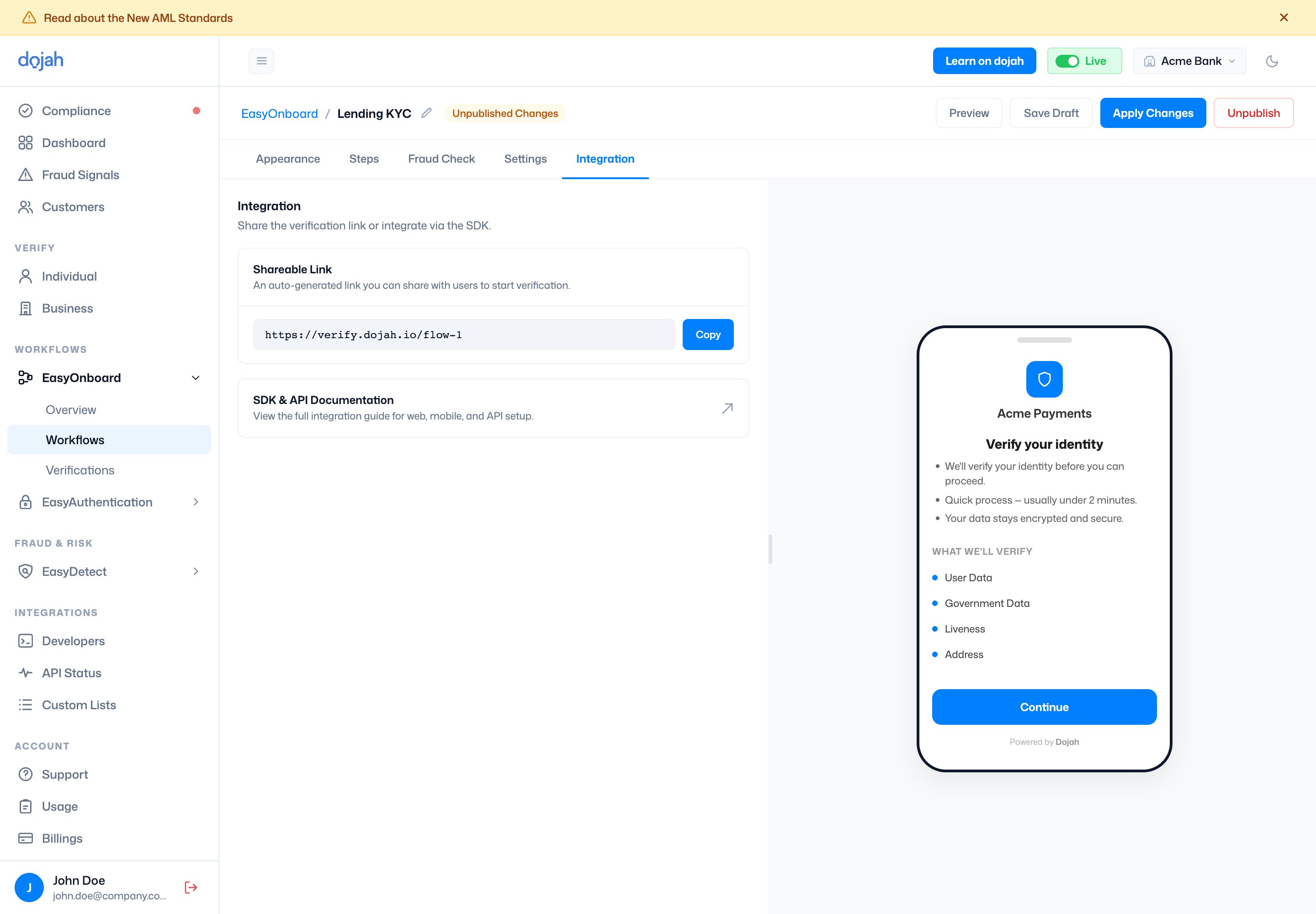
How you take the flow live. Once a workflow is published, the **Integration** tab gives you a **Shareable Link** — a hosted verification page you can send straight to users — plus a link to the [SDK & API reference](/api-reference/get-started/introduction) for embedding the same flow in your own web or mobile product.
### Appearance
Brands the widget so it matches your product. Settings here drive the live preview.
| Setting | What it controls |
| -------------------- | ----------------------------------------------------------------------------- |
| Branding | The linked app, a logo (PNG, SVG, or JPG, up to 2 MB), and your brand colour. |
| Display Name | The name shown at the top of the widget. |
| Font | The widget font — e.g. Inter, DM Sans, Manrope, Poppins, Lato, or Roboto. |
| Button Border Radius | The roundness of buttons, from square to pill. |
### Steps
The verification steps in the flow, in order. Add them from a catalogue:
| Step | What it collects |
| -------------------- | -------------------------------------------------------------- |
| Get Started | A welcome screen shown before verification begins. |
| User Data | Name, email, and phone number. |
| Government Data | A government ID lookup — NIN, BVN, passport, driver’s licence. |
| Government Issued ID | Capture and verification of an ID document. |
| Liveness | A selfie with liveness detection to confirm a real person. |
| Address | Residential address verification. |
| Email | Email verification by one-time password. |
| Questions | Your own custom questions (open, single-, or multiple-choice). |
Each step shows its own cost, and the builder totals an **estimated cost per verification** as you go.
### Fraud Check
Under **Fraud Rules** you switch on checks that watch for suspicious activity as a user goes through the flow. Each rule is toggled on or off, and you choose what happens when it triggers — **Pending** (flag the session for your review) or **Fail** (reject it automatically).
| Fraud rule | What it checks |
| --------------------- | ------------------------------------------------------------------------------------------------------------------------------------------------------ |
| User Data | Whether the name and date of birth are consistent across data sources. |
| Age Limit | Flags users below a minimum age you set. |
| Liveness Check | Compares the selfie against the submitted ID photo, with liveness-score and image-match thresholds. |
| AML Screening | Screens against sanctions and PEP databases — choose which lists (**PEP**, **Adverse Media**, **Sanctions**, **Warning**) and a match-score threshold. |
| Duplicate ID | Blocks reuse of the same ID number or face across verifications. |
| IP / Device Screening | Flags suspicious devices, VPNs, or proxies. |
| Digital Address | Verifies the user’s address by matching their geolocation. |
### Settings
Controls how verifications are reviewed, who’s notified, and where the flow runs:
| Setting | What it controls |
| ---------------------------- | ----------------------------------------------------------------------------------------------------------------------------------------------------------- |
| Review Process | **Automatic** returns a result as soon as the checks finish; **Manual** holds each session for your team to review before a result is returned to the user. |
| Business Notifications | How your team is alerted to verifications — by **webhook**, **email**, or both. |
| User Notifications | Email updates sent to the user, plus the support email they can reach you on. |
| Countries | Allow or block specific countries — or allow them all. |
| Resume Verifications | Let users pick up an unfinished verification where they left off. |
| Same-Device Agent Resume | Allow a verification to be resumed on the same device. |
| Multiple Device Verification | Allow a user to continue a verification across more than one device. |
| Confirmation Page | Show Dojah’s default completion page, or set a **Redirect URL** to send users back into your app afterwards. |
### Integration
How you take the flow live. Once a workflow is published, the **Integration** tab gives you a **Shareable Link** — a hosted verification page you can send straight to users — plus a link to the [SDK & API reference](/api-reference/get-started/introduction) for embedding the same flow in your own web or mobile product.