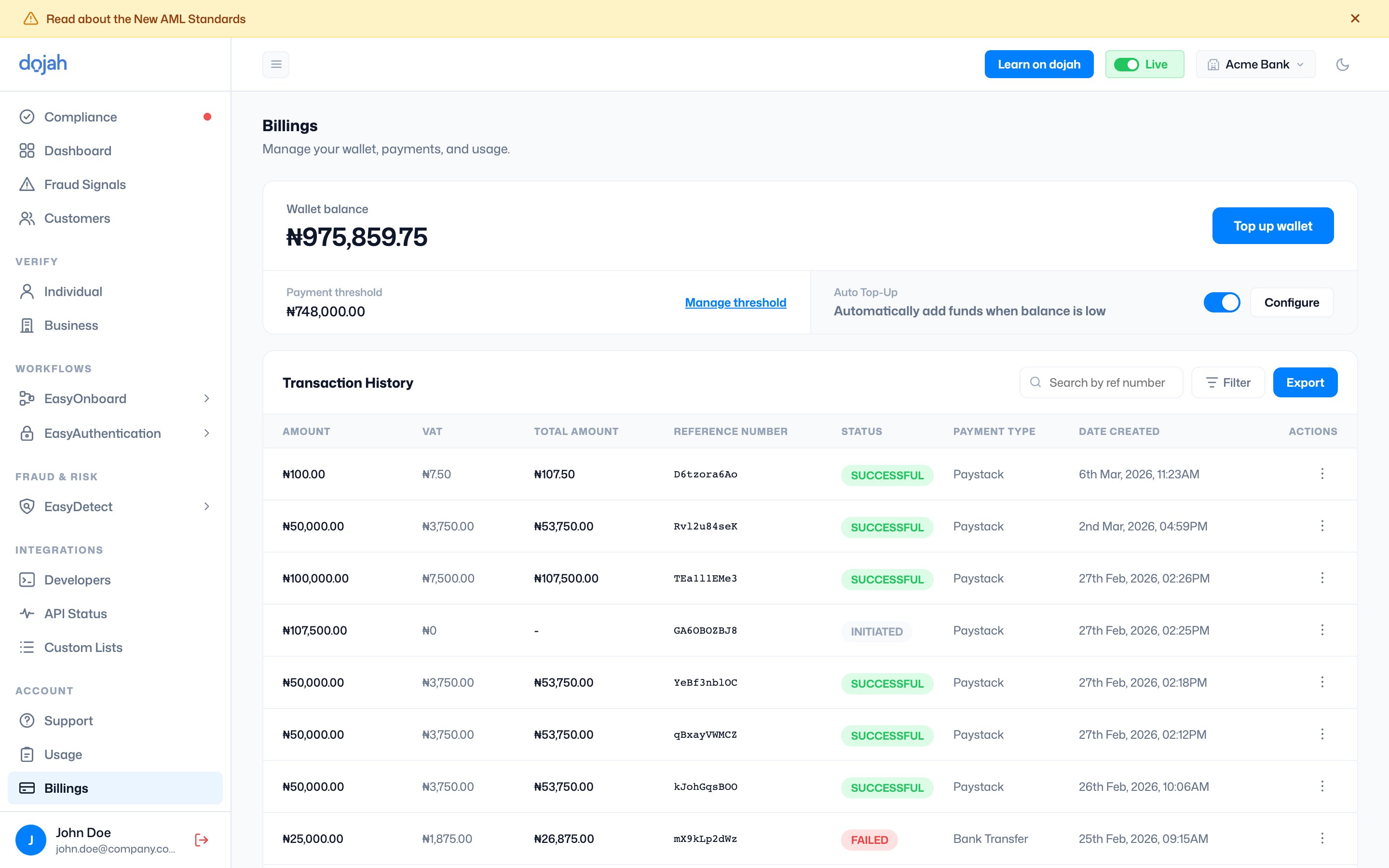
The Billings page is where you manage everything related to your Dojah wallet, your current balance, how you top it up, how automatic top-ups work, and the full history of every payment made on your account. All API calls on Dojah are funded from your wallet balance, so keeping it topped up is essential to uninterrupted service.Documentation Index
Fetch the complete documentation index at: https://docs.dojah.io/llms.txt
Use this file to discover all available pages before exploring further.

Wallet balance
The large figure at the top of the page shows your current available wallet balance in real time. This is the amount available to fund API calls. The balance updates immediately each time a top-up is processed or a verification call consumes credit. The currency displayed depends on your account region; Nigerian accounts show balances in Nigerian Naira (₦), while accounts in other countries display in USD.
Payment threshold
Below the wallet balance, the Payment Threshold shows the minimum balance level you have set as your alert trigger. When your wallet balance drops to this amount, Dojah sends you a notification so you know it is time to top up. To update the threshold, click Manage Threshold. A modal opens where you enter your preferred threshold amount in Naira or USD and click Save. Set this to an amount that gives you enough warning to top up before your balance hits zero; consider your typical daily API call volume when deciding what level to use.


Topping up your wallet
Click Top Up Wallet (top right of the Billings page) to add funds to your account. A modal opens with the following options: Amount: Enter the amount you want to add to your wallet. The minimum top-up amount is ₦50,000.00 (excluding VAT). Once you enter an amount, the modal immediately shows a cost breakdown: the base amount, VAT at 7.5%, and the total amount that will be charged. Payment Method, Choose how you want to pay:- Paystack: Pay using Paystack’s payment gateway. After selecting Paystack and clicking Pay, the Paystack checkout opens with the following payment options:
- Card: Pay with a debit or credit card (Visa, Mastercard, Amex, Discover). Enter your card number, expiry date, and security code. Payments are processed securely via Paystack.
- Transfer: Pay via bank transfer. Paystack generates a one-time virtual account number for your payment. The bank name and account number are displayed; transfer the exact amount shown and then click ‘I have made the transfer’ to notify the system. The wallet is credited once the transfer is confirmed.
- Bank: Pay via direct bank debit through your Nigerian bank account.
- USSD: Pay using your bank’s USSD code directly from your phone.


- Bank Transfer: Pay by transferring directly to Dojah’s bank account. When you select this option, a dedicated account number and bank name are displayed along with the exact amount to transfer (including VAT). Transfer the exact amount shown, then click ‘I have made the transfer’. Your wallet is credited once the payment is confirmed.


Auto Top-Up
Auto Top-Up eliminates the risk of your wallet running out unexpectedly by automatically adding funds whenever your balance drops to your set threshold. When enabled, a card is charged automatically without requiring any manual action from your team. Enabling Auto Top-Up - The Auto Top-Up toggle is in the top section of the Billings page, to the right of the payment threshold. When Auto Top-up is toggled on, the Configure button becomes activated. When active, the toggle appears green, and Configure remains available to manage the settings. Configuring Auto Top-Up: Clicking ‘Configure’ opens the Auto Top-Up Settings modal, which shows:- Your current balance threshold: the balance level that triggers an automatic top-up
- An amount field where you enter how much should be added each time a top-up is triggered. The minimum is ₦50,000 (excluding VAT). The modal shows the VAT amount and total charge so you know exactly what will be billed each time the top-up fires.


Transaction History
Below the wallet controls, the Transaction History table shows every wallet-related payment made on your account, top-ups, auto top-ups, and card verification charges. Each row shows: Amount: The base amount of the transaction before VAT. VAT: The VAT charged on the transaction at 7.5%. Total Amount: The combined total of amount and VAT actually charged. For transactions that were initiated but not completed, this column shows a dash. Reference Number: A unique identifier for each transaction. Use this when searching for a specific transaction or when referencing a payment with Dojah support. Status: The outcome of the transaction:- SUCCESSFUL: The payment is completed, and the funds have been credited to your wallet.
- INITIATED: The payment was started but has not yet completed. This appears for bank transfers that have been submitted but not yet confirmed or for payments still in progress.
