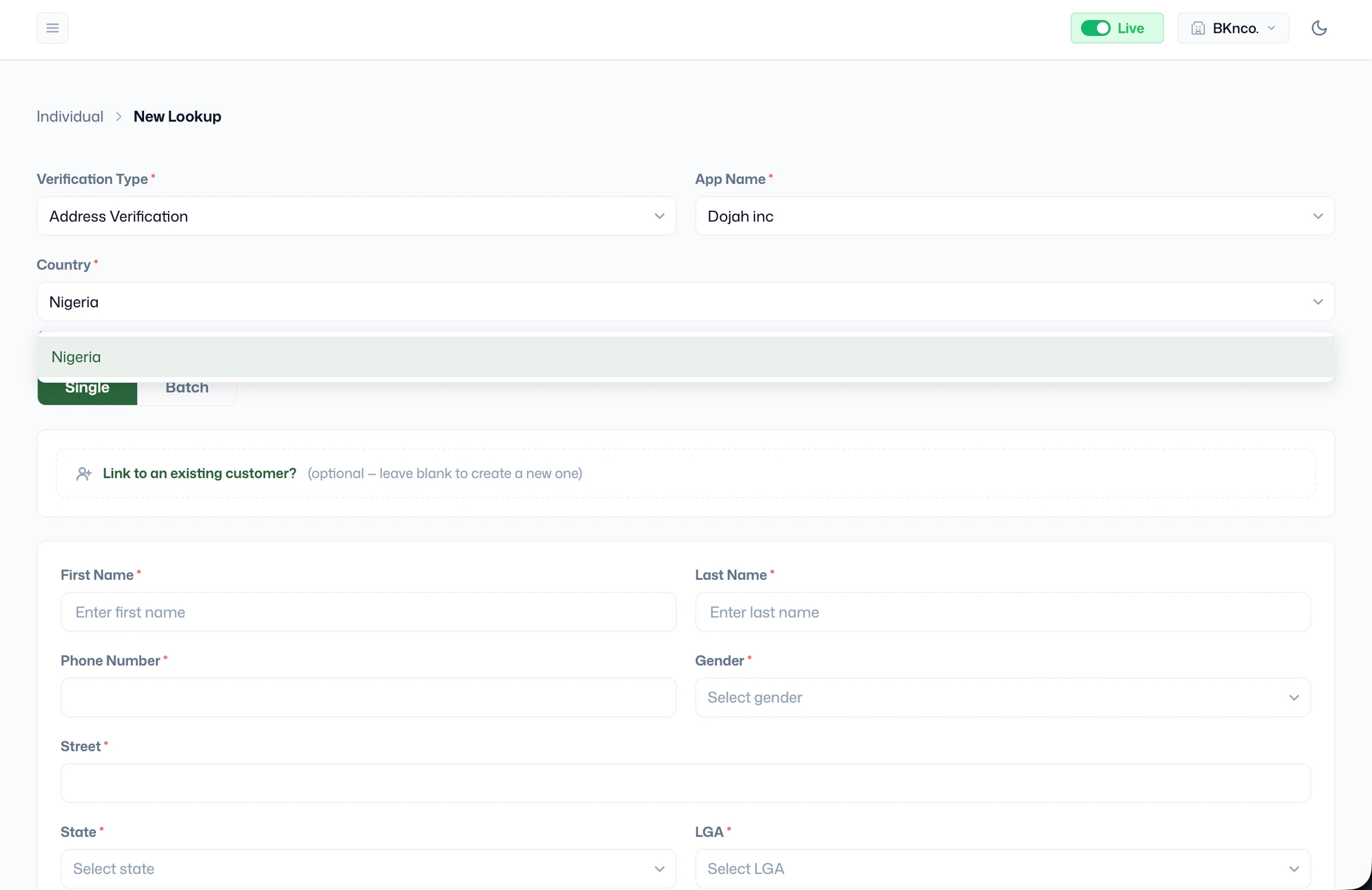
Running an Address Verification
- Go to Verify > Individual, click + New Lookup, and select Address Verification as the Verification Type.
- App Name - Select the application this verification should be logged under.
- Country - Currently Nigeria is the only supported country for address verification.
- Single or Batch - Choose Single for a one-off check. Use Batch to submit multiple address verifications at once via file upload.
- Link to an existing customer - If this person already has a profile in your Customers section, link the verification to their existing record so all their checks stay in one place. Leave blank to create a new customer profile automatically.
- Fill in the following required fields:
- First Name and Last Name - The full legal name of the person whose address is being verified.
- Phone Number - The person’s active Nigerian mobile number. This is used by the field agent to contact the individual prior to or during the address visit.
- Gender - Select the person’s gender.
- Street - The full street address including house number, street name, and any estate or compound name. Be as specific as possible; a vague street description will make it harder for the field agent to locate the correct property.
- State - Select the Nigerian state where the address is located.
- LGA (Local Government Area) - Select the specific LGA within the chosen state. This narrows the address location for the field agent and is required for all Nigerian address verifications.