Running an AML Screening lookup
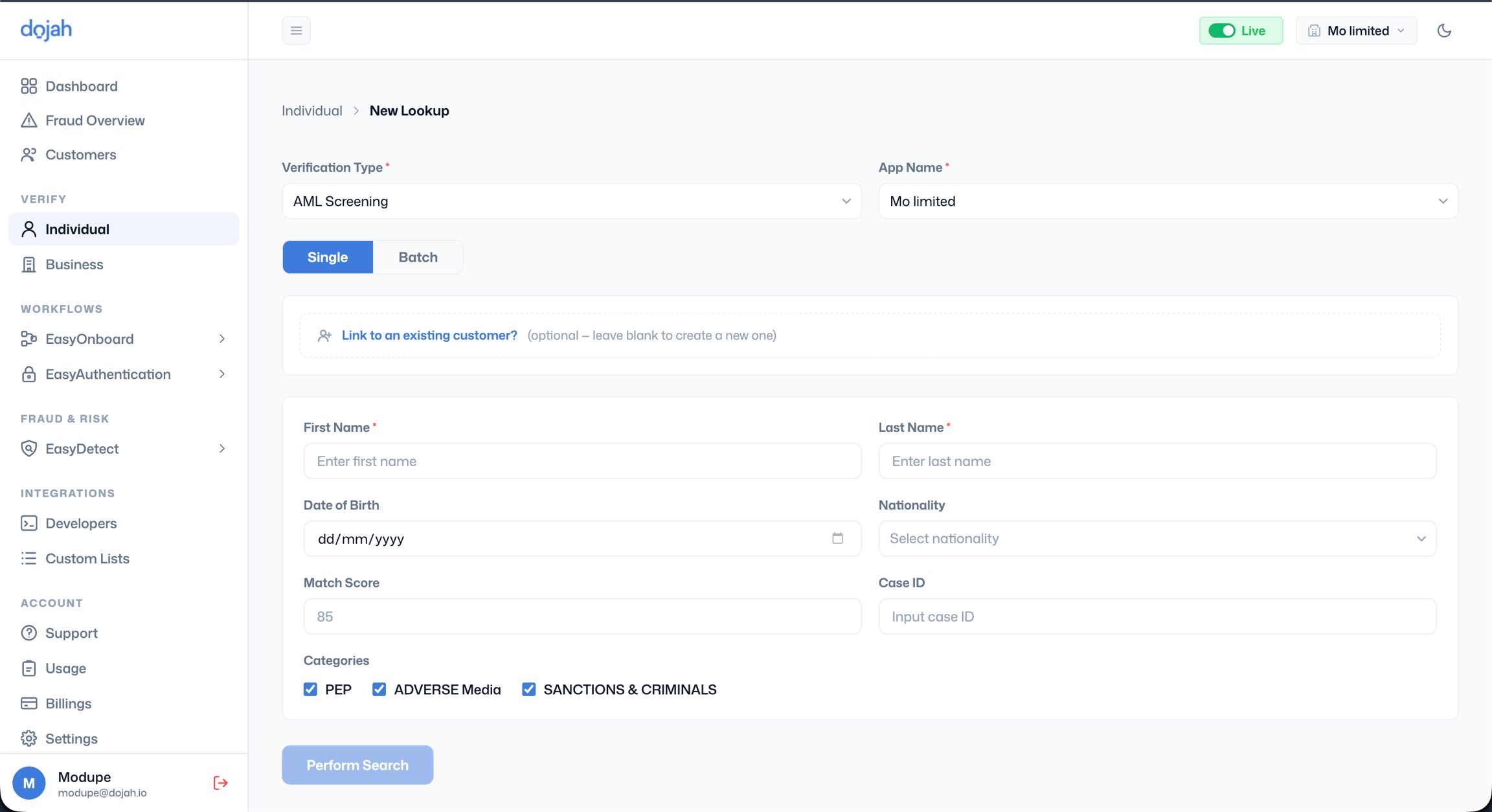
- Go to ‘Verify’ > ‘Individual’, click ’+ New Lookup’, and select ‘AML Screening’ as the ‘Verification Type’.
- App Name - Select the application this screening should be logged under.
- Single or Batch - Choose Single to screen one person now. Use Batch to screen multiple people at once using an uploaded file.
- Link to an existing customer - If the person already has a profile in your Customers section, link this screening to their existing record so all checks remain consolidated in one place. Leave blank to create a new customer profile automatically.
- Fill in the following fields:
- First Name and Last Name - Enter the person’s full legal name exactly as it appears on their identity document. The accuracy of the screening result depends heavily on the name entered. Using a nickname, abbreviation, or informal name variant may cause legitimate matches to be missed.
- Date of Birth - Optional but strongly recommended. Providing a date of birth significantly reduces false positives by helping the system distinguish between people who share the same name. Format: dd/mm/yyyy.
- Nationality - Optional. Selecting the person’s nationality further improves match accuracy, particularly for common names.
- Match Score - This field controls the minimum confidence threshold for returning a result. 85 is displayed as the placeholder score, meaning only matches with a similarity score of 85% or higher will be returned. The placeholder score is there to help you make an informed decision on your match score input. Lowering this value will return more results including weaker matches, which increases the chance of catching a real hit but also increases false positives. Raising it narrows results to only very close name matches. For most compliance purposes, 85 is the recommended starting point.
- Case ID - Optional. If your internal compliance system uses case reference numbers, you can enter one here to link this screening result to a specific case in your records.
- Categories - Select which watchlist categories to screen against. PEP, Adverse Media, and Sanctions & Criminals are all checked by default. Deselect any that do not apply to your screening policy.
- Click Perform Search when ready.
Match statuses
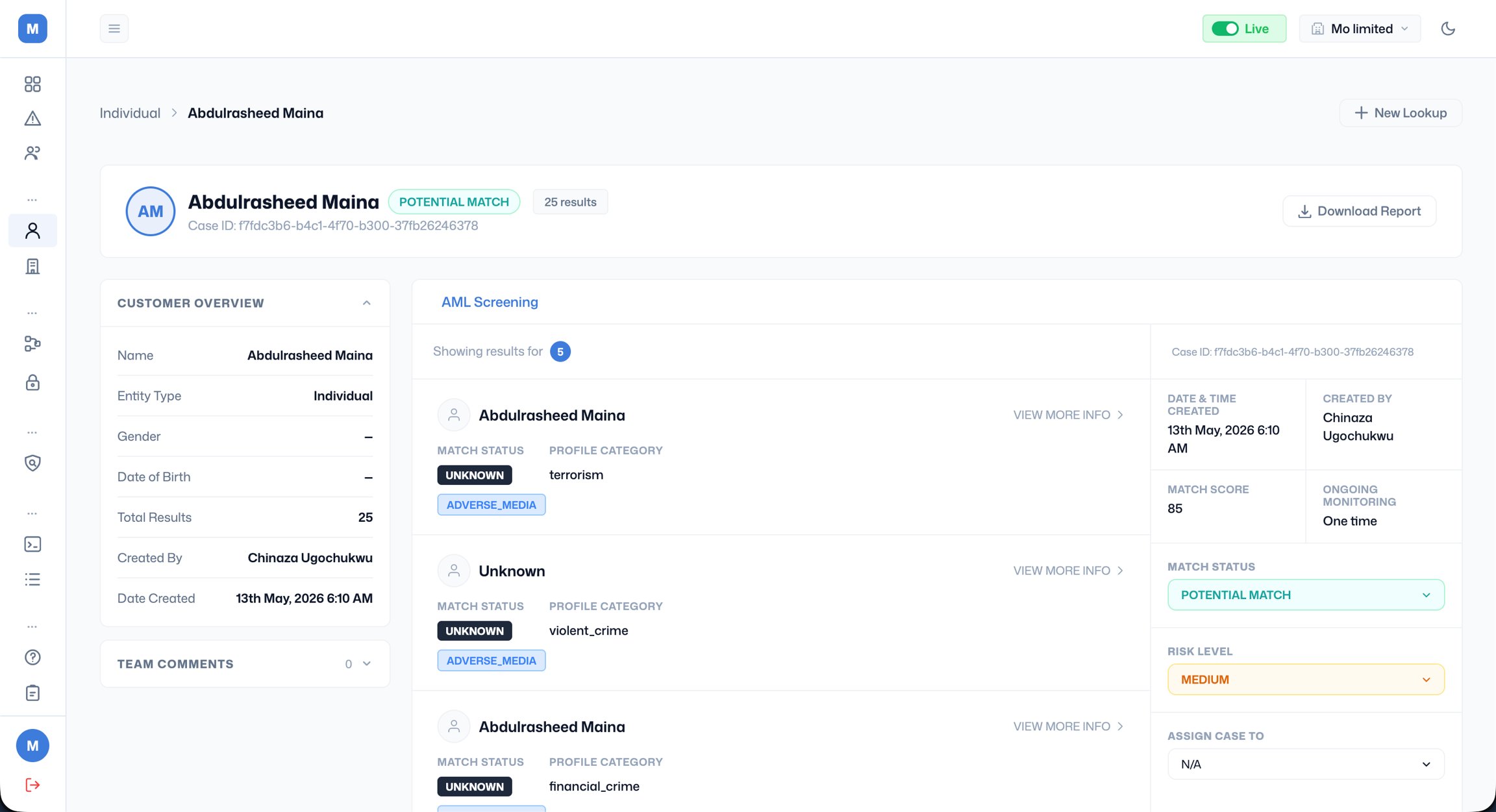
When a screening result comes back, every case and every individual watchlist entry within it carries a match status. Your compliance team can also manually update the status as part of the review process. The full list of possible statuses is: CONFIRMED MATCH - The system has identified one or more entries that closely match the submitted identity based on your match score threshold. This requires mandatory review before any decision is made on the customer. It does not automatically mean the customer is prohibited, but you cannot proceed without investigating. For all confirmed matches, update the case status in the right panel, assign it to the appropriate team member, and document your review decision using Team Comments before closing or escalating the case. PARTIAL MATCH - The entry shares some but not all identifying characteristics with the submitted details. For example, the name matches, but the date of birth or nationality differs. Partial matches should not be dismissed without review; they can still represent genuine hits, particularly where the watchlist entry has incomplete data. POTENTIAL MATCH - A weaker similarity has been detected. The system flagged the entry as worth reviewing but with lower confidence than a confirmed or partial match. These are more likely to be false positives but should still be reviewed, especially for sanctions categories. NO MATCH - No entries were found across the screened databases within your match score threshold. This is the expected result for the vast majority of legitimate customers and means the screening is clear to proceed. FALSE POSITIVE - This status is set manually by your compliance team after reviewing a match and determining it relates to a different individual, not your customer. Marking a result as False Positive documents your reviewed decision and creates an audit trail showing the case was not ignored. UNKNOWN - The system was unable to determine a match status, typically due to incomplete data returned from the source database. Cases with this status should be treated with caution and reviewed manually before proceeding.Risk levels
Every AML screening case is automatically assigned a risk level based on the nature and strength of the matches found. Your compliance team can override this after review. The possible risk levels are: HIGH - The case contains matches associated with sanctions lists, serious criminal activity, or other high-severity watchlist categories. A HIGH risk rating requires immediate escalation to your compliance officer. Proceeding with a HIGH risk customer without authorisation may expose your organisation to regulatory and legal liability. MEDIUM - The case contains PEP matches or moderate-confidence matches on other watchlist categories. A MEDIUM rating does not prohibit proceeding but requires enhanced due diligence, additional information gathering, source of funds verification, and senior sign-off before onboarding. LOW - The match is weak or the matched category carries limited regulatory risk. A LOW rating still requires a review to confirm it is not a genuine hit, but it is less likely to affect the onboarding decision. UNKNOWN - The system could not assign a risk level, typically because the match data returned was insufficient to classify. Treat UNKNOWN risk cases as MEDIUM until your team has reviewed the full details and made a manual assessment. When updating the risk level manually after review, always document your reasoning in the Team Comments section so there is a clear record of why the classification was changed and who made the decision.